# Workbase Full LLM Context
This file contains public, indexable Workbase content in Markdown form. HTML pages remain canonical.
## Site Summary
Workbase connects conversations, workflows, and operations in one shared AI workspace.
## Documentation
# Workbase Documentation (/docs)
Workbase documentation for setup, core workflows, and answers to common product questions.
Welcome to the Workbase Help Center. Use these guides to set up a workspace, understand the main product areas, and give teammates a clean explanation of how Workbase works.
## Start here
- **Getting started:** Set up the workspace baseline before adding advanced workflows.
- **Workspace navigation:** Understand the shell, sidebar, command palette, and settings areas.
- **Resources:** Learn the shared model behind search, mentions, agents, inbox, records, files, and tasks.
- **Agents:** Use agents with connected workspace context and visible run history.
- **Inbox:** Manage shared conversations with statuses, drafts, comments, and handoffs.
- **Data:** Work with objects, records, lists, views, imports, and enrichment.
## Find the right guide
- Start with **Getting started** when you are setting up a new workspace.
- Use **Workspace navigation** and **Resources** to understand the shared structure behind pages, search, records, files, conversations, and agent context.
- Use **Inbox** when your team is handling shared customer conversations.
- Use **Data** when you are configuring objects, records, imports, lists, views, or enrichment.
- Use **Agents** when you are building repeatable AI-assisted workflows with connected workspace context.
- Use the **Admin** guides for users, permissions, plans, credits, and workspace settings.
# Getting started (/docs/getting-started)
Set up the basics of your Workbase workspace.
Use this guide when a workspace is new or when you want to reset the team around a clean operating model. The goal is to confirm the basics before adding agents, shared inbox workflows, imports, or custom data structures.
## Before you start
You should know who owns the workspace, which teammates need access, and which first workflow should be configured. Keep the first setup narrow. It is easier to expand a clean workspace than to repair a confusing one.
## First steps
- **Confirm workspace settings:** Open workspace settings and check the workspace name, organization identity, billing contact, and primary admins.
- **Invite the right teammates:** Add the people who need to work with customer conversations, records, lists, imports, agents, or billing.
- **Choose the first workflow:** Pick one starting point: shared inbox, company records, a list-based workflow, or an agent-assisted handoff.
- **Create the first source of truth:** Set up the first object, list, inbox connection, or library folder so the team has one place to start.
- **Review search and resources:** Make sure the team understands that Workbase can search and connect workspace resources across product areas.
## Recommended setup order
1. Review workspace settings.
2. Invite owners and admins first.
3. Add team members after the first workflow is clear.
4. Configure data or inbox before configuring agents.
5. Connect agents only after the resources they should use already exist.
## What to avoid
- Do not create too many objects before the team agrees on what each object represents.
- Do not connect an agent to vague context. Connect it to specific resources, objects, channels, or tools.
- Do not use the inbox as a task tracker. Use conversation status for message state and tasks or boards for follow-up work.
## Next guides
- **Workspace navigation:** Learn where key surfaces live.
- **Resources:** Understand the shared model behind search, context, and agent connections.
- **Objects and records:** Create the data model for customer and company information.
# Workspace navigation (/docs/workspace/navigation)
Understand the Workbase workspace shell, sidebar, command palette, and settings areas.
The workspace shell is the main frame around Workbase. It gives every workspace a consistent left sidebar, top navigation, command palette, resource breadcrumbs, and access to settings.
## Main areas
- **Home** is the workspace starting point.
- **Agent** opens the general assistant conversation surface.
- **Agents** lists custom agents and their run history.
- **Inbox** is the shared conversation workspace when enabled.
- **Objects** hold structured records.
- **Lists** group records or entries around a workflow.
- **Boards** hold task workflows when enabled.
- **Library** stores files, notes, skills, integrations, MCP tools, calls, whiteboards, attachments, and archived items.
- **Settings** contains profile, connected accounts, users, billing, plans, objects, lists, boards, privacy portal, and other workspace configuration.
## Sidebar sections
The sidebar can show static navigation and dynamic workspace resources. Common dynamic sections include favorites, lists, boards, and objects. Some items can show counts, active states, and resource icons.
Use favorites for resources you return to often. Use sidebar visibility for resources that should become part of the team navigation.
## Command palette
The command palette combines local actions and workspace search. It can open pages, find workspace resources, and start an AI request from the current query.
Use it when you know what you want but do not want to click through the sidebar. Search results can include records, notes, files, conversations, lists, tasks, apps, skills, and other resources.
## Breadcrumbs and resource actions
Many product pages expose the current resource in the top area. Depending on the resource type, actions can include opening, copying a link, favoriting, renaming, editing the icon, relating it to another resource, or showing it in the sidebar.
## Settings navigation
Settings is where workspace-level configuration lives. Use it for users, plans, billing, connected accounts, workspace identity, objects, lists, boards, privacy portal, and feature-specific configuration.
## Related guides
- **Resources:** Learn the shared model behind search, previews, relations, and agent context.
- **Users and permissions:** Understand who can manage workspace configuration.
- **Objects and records:** Understand the structured data areas shown in navigation.
# Resources (/docs/workspace/resources)
Learn the shared Workbase model behind search, mentions, previews, relations, favorites, and agent context.
A resource is anything Workbase can treat as a workspace item. Resources are the connective model behind search, mentions, previews, relations, favorites, agent context, and navigation.
## Common resource types
Workbase resources can include assistant conversations, custom agents, inbox conversations, files, folders, users, automations, agent runs, apps, lists, list entries, list views, MCP tools, notes, objects, object records, object views, skills, tasks, and boards.
Not every resource supports every action. Some can be opened, previewed, related, favorited, renamed, or shown in the sidebar. Others are read-only or used only in specific workflows.
## Why resources matter
Resources let Workbase avoid isolated product areas. A customer conversation can relate to a company record. A record can be added to a list. An agent can read a note or file. A task can preserve follow-up context. Search can find all of them through one model.
## Search and read behavior
Workspace search can return matching resources from navigation, records, inbox, library, lists, notes, apps, automations, MCP tools, skills, and the resource index. For AI and agent workflows, a search result can be opened or read with more detail when the workflow needs deeper context.
## Mentions and selection
When a product surface asks you to choose workspace context, it often uses the same resource search model. This keeps agent connections, relation pickers, mention pickers, command palette results, and other selectors consistent.
## Resource actions
Depending on the resource type, actions can include:
- Copying a link.
- Opening the resource.
- Previewing the resource.
- Favoriting the resource.
- Renaming the resource.
- Editing the icon.
- Relating it to another resource.
- Showing it in the sidebar.
## Best practices
- Create resources where the work actually belongs. Do not use notes for records or inbox status for tasks.
- Use relations when two items should stay connected across workflows.
- Use favorites for your personal access.
- Use sidebar visibility for team-level navigation.
- Connect agents to specific resources instead of asking them to infer context.
## Related guides
- **Connect resources to agents:** Attach the right workspace context to a custom agent.
- **Conversation workflow:** Relate inbox conversations to records, tasks, or notes.
- **Objects and records:** Use records as the source of truth for structured data.
# Agents (/docs/agents)
Learn how Workbase agents use workspace context to support customer-facing workflows.
Agents help teams move work forward using the context already stored in Workbase. They are most useful when they are connected to specific resources, have a clear goal, and produce output that a teammate can review.
## What agents can use
Agents can work with workspace context such as records, conversations, files, notes, lists, tasks, apps, skills, MCP tools, and prior agent runs. The exact context available depends on the agent, the workspace resources it is connected to, and the permissions available in the workspace.
## Agent surfaces
### Workspace agent
The workspace agent is the general assistant surface. Use it for questions, analysis, and guided work across the workspace.
### Research workflows
Research workflows are designed for source-backed enrichment. They should prefer reliable answers, use public and workspace context where available, and return structured results instead of guessing.
### Custom agents
Custom agents are configured around a repeatable job. Common examples include inbound qualification, pipeline follow-up, account research, and deliverability review.
## Good agent setup
- **Define one job:** Write the agent goal as one repeatable workflow, not a broad job description.
- **Connect real context:** Attach the resources the agent should use, such as an inbox channel, object, record list, app, integration, or MCP tool.
- **Decide the handoff:** Choose what the agent should produce: a summary, a draft, a task, a record update, or a recommendation.
- **Review runs:** Check run history, status, tool calls, credit usage, and failed runs before relying on the workflow.
## What to document for each agent
- What triggers the agent.
- Which resources it can read.
- Which actions it can take.
- Whether it needs human approval.
- Where output appears.
- How failed runs are reviewed.
## Next guides
- **Custom agents:** Create agents for repeatable workflows.
- **Connect resources:** Attach the workspace context an agent needs.
- **Triggers and runs:** Understand manual, scheduled, and workflow-driven execution.
# Custom agents (/docs/agents/custom-agents)
Create custom agents for repeatable Workbase workflows.
Custom agents are for repeatable workflows. They should have one clear job, connected context, visible ownership, and run history that can be reviewed.
## Good use cases
- **Inbound Qualification:** Review new inbound companies, check fit, summarize buyer context, and prepare a handoff.
- **Pipeline Follow-up:** Review stale deals, identify the last meaningful interaction, and create follow-up tasks.
- **Account Research:** Research target accounts before outreach and enrich the company record.
- **Deliverability Review:** Review bounced outreach, group failure reasons, and recommend cleanup actions.
## Before you create one
Make sure the workflow already has a clear source of truth. For example, inbound qualification should have inbox conversations and company records. Pipeline follow-up should have deal records or a board. Account research should have target account records or a list.
## Agent configuration checklist
- **Name the job:** Use a specific name that describes the workflow, such as Inbound Qualification or Pipeline Follow-up.
- **Set ownership:** Set an owner or team so people know who maintains the agent.
- **Write the prompt:** Explain the task, the expected output, and when the agent should ask for approval.
- **Connect context:** Add the resources the agent needs, such as an inbox channel, object, integration, MCP tool, or app.
- **Review first runs:** Run the agent on a small sample before relying on it for a full workflow.
## Prompt guidance
Good prompts are operational. They tell the agent what to inspect, what output to produce, what not to do, and when to request human review.
Avoid prompts like "help with sales." Prefer prompts like "Review new inbound companies, check whether the account matches ICP criteria, summarize buyer context, and prepare a concise owner handoff. Ask for approval before changing deal stage or sending external messages."
## Review quality
Review the run summary, status, tool calls, credit usage, and output location. If the agent failed, check whether the failure came from missing context, missing permissions, unclear instructions, or an unavailable integration.
## Related guides
- **Connect resources:** Attach searchable workspace resources to an agent.
- **Triggers and runs:** Understand how agents start and how run history should be reviewed.
- **Resources:** Understand what agents can search, read, and reference.
# Connect resources (/docs/agents/connect-resources)
Attach the workspace context a custom agent needs.
Agent connections tell Workbase which workspace context belongs to an agent. Use connections to make the agent's working area explicit.
## Connectable context
Depending on the workspace, agents can be connected to resources such as inbox channels, objects, apps, integrations, MCP tools, files, folders, records, tasks, notes, lists, skills, and other searchable resources.
The connection has a name, target type, status, and description. The description should say how the resource helps the agent.
## Connection statuses
- **Enabled:** The connection is configured and can be used.
- **Connected:** The connection represents an active channel or live account.
- **Needs review:** The connection exists but should be checked before relying on it.
## How to choose resources
- **Start with the input:** Add the place where work begins, such as an inbox channel, object, list, or board.
- **Add the source of truth:** Add the object, record type, or list the agent should use when reading or writing context.
- **Add tools carefully:** Add MCP tools, integrations, or apps only when the agent actually needs them for the workflow.
- **Document the purpose:** Write a short connection description so reviewers understand why the resource is attached.
## Examples
- Inbound Qualification can connect to Workspace Inbox, a Companies object, and a follow-up board or list.
- Pipeline Follow-up can connect to a Deals object and a task board.
- Account Research can connect to a Companies object, a target account list, and enrichment tools.
- Deliverability Review can connect to Workspace Inbox and relevant deliverability resources.
## Troubleshooting
- If the agent misses obvious context, check whether the resource is connected.
- If a resource cannot be found, search for it by title and verify it is visible in the workspace.
- If a connection looks stale, mark it needs review until the owner confirms it.
- If the agent should not act on a resource, remove the connection instead of relying only on prompt wording.
## Related guides
- **Resources:** Learn what Workbase resources are and how they are searched.
- **Custom agents:** Design a repeatable agent workflow.
- **Triggers and runs:** Review when an agent starts and what happened during execution.
# Triggers and runs (/docs/agents/triggers-runs)
Understand how custom agents start and how to review their run history.
A trigger decides when an agent should run. A run is the execution record that shows what happened.
## Trigger types
Custom agents can support manual runs and workflow-driven triggers. Depending on the workspace setup, triggers can also be scheduled or fired by changes in another product surface, such as a task-column change or inbound workflow event.
Use manual runs while testing. Use scheduled or workflow-driven triggers only after the agent has produced good results on a small sample.
## Run history
Run history helps you evaluate reliability. A run can include status, summary, start time, completion time, duration, credits, tool calls, and failure details.
## How to review a run
- **Check the status:** Confirm whether the run completed, failed, or is still in progress.
- **Read the summary:** Confirm the result matches the workflow goal.
- **Review tool usage:** Check whether the agent used the expected resources or tools.
- **Check output location:** Verify where the output landed, such as a record, task, draft, note, or handoff.
- **Inspect failures:** Missing context, unavailable integrations, timeouts, and unclear prompts are common causes.
## When to pause a trigger
Pause or disable a trigger when:
- The connected resource is no longer correct.
- The prompt is being revised.
- The output requires too much manual correction.
- The agent is using unexpected tools.
- A downstream workflow or integration is unavailable.
## Related guides
- **Custom agents:** Design the agent before automating it.
- **Connect resources:** Make sure the run has the context it needs.
- **Plans and credits:** Review plans, credits, and usage controls before scaling agent workflows.
# Inbox (/docs/inbox)
Understand the shared inbox model for team conversations.
Inbox is where teams manage shared customer communication. It brings connected mailboxes, conversation state, internal collaboration, and customer context into one workspace surface.
## Core ideas
- A conversation should be easy to scan.
- Ownership and status should be visible.
- Internal comments should stay separate from customer replies.
- Drafts, scheduled sends, waiting states, and resolved states should be explicit.
- Follow-up work should live in tasks, records, or related resources instead of disappearing in the thread.
## Conversation states
Inbox conversations can appear in operational sections such as open, waiting, resolved, drafts, scheduled, sent, or spam. The exact labels available in the UI can depend on the workspace configuration and connected account state.
## Typical workflow
- **Open the right section:** Start from open conversations when triaging new work, or use waiting and scheduled when reviewing follow-ups.
- **Read the thread context:** Check the customer, subject, preview, attachments, unread state, and any internal comments.
- **Choose the next state:** Reply, comment internally, mark waiting, resolve, snooze, move back to inbox, or mark spam.
- **Relate follow-up work:** Link the conversation to a record, task, note, or other resource when the context should stay available outside the inbox.
## Next guides
- **Shared inbox setup:** Connect mailboxes and prepare team access.
- **Conversation workflow:** Handle replies, comments, statuses, drafts, and handoffs.
- **Resources:** Understand how conversations connect to the rest of Workbase.
# Shared inbox setup (/docs/inbox/shared-inbox-setup)
Prepare connected inboxes for team-based customer communication.
Use shared inbox setup when a team needs to manage customer communication together instead of inside individual email accounts.
## Before you start
Confirm which mailbox or account should be connected, who owns it, who should see it, and what the first triage workflow should be. A shared inbox works best when ownership and visibility are decided before messages arrive.
## Setup checklist
- **Choose the account:** Decide which provider account or mailbox should be connected to the workspace.
- **Set visibility:** Decide whether the mailbox should be visible to the whole workspace or a smaller group.
- **Confirm ownership:** Assign an owner or responsible team for connection health and inbox process.
- **Review signatures:** Configure or assign email signatures before teammates start replying.
- **Triage the first conversations:** Move early threads into the correct states so the team sees the intended workflow.
## What to check after connecting
- The mailbox appears in inbox navigation.
- Conversations load in the expected sections.
- Unread state and message previews look correct.
- Draft and reply actions are available to the right users.
- Internal comments are clearly separated from customer replies.
- The connection does not show an unresolved provider error.
## Best practices
- Start with one shared mailbox before connecting many accounts.
- Make mailbox purpose clear in the display name.
- Keep internal notes in comments, not reply drafts.
- Create records or tasks for follow-up work that should outlive the email thread.
- Review waiting and scheduled sections regularly.
## Related guides
- **Inbox overview:** Understand the inbox model and conversation states.
- **Conversation workflow:** Handle replies, comments, statuses, drafts, and handoffs.
- **Connect resources to agents:** Connect inbox context to an agent workflow.
# Conversation workflow (/docs/inbox/conversation-workflow)
Handle inbox replies, comments, statuses, drafts, scheduled sends, and follow-up handoffs.
Use this guide when you are working a conversation from triage to resolution.
## Conversation anatomy
A conversation can include the sender, subject, customer details, status, preview, unread count, attachments, tags, assignee or relationship labels, internal comments, drafts, pending sends, and messages.
## Recommended handling flow
- **Scan the thread:** Read the latest message, subject, customer identity, attachments, and previous activity.
- **Decide reply or comment:** Use a reply for external communication. Use an internal comment for teammate context.
- **Choose the state:** Keep it open when action is needed, waiting when you need a response, resolved when done, and spam when it should leave the normal queue.
- **Save or send carefully:** Drafts preserve unfinished replies. Scheduled sends should be reviewed from the scheduled section.
- **Create durable follow-up:** Relate the thread to a record, note, task, or other resource if future work depends on it.
## Status guidance
- **Open or needs reply:** The team still needs to act.
- **Waiting:** The team is waiting for the customer or another external step.
- **Resolved:** No more action is needed right now.
- **Drafts:** A response exists but has not been sent.
- **Scheduled:** A response is queued for later.
- **Sent:** The outbound message was sent.
- **Spam:** The thread should not be handled as a normal conversation.
## Collaboration rules
- Do not put internal context into a customer reply.
- Do not mark a thread resolved if a teammate still has a pending task.
- Do not use waiting as a catch-all archive. Waiting should mean there is a reason to return.
- Use related resources when the thread changes a customer record, deal, list, or task.
## Agent handoffs
Inbox can be useful agent context. For example, an inbound qualification agent can read new messages, summarize buyer context, and prepare a handoff. Keep human approval in place for external messages or record changes that need review.
## Related guides
- **Shared inbox setup:** Prepare connected inboxes for team use.
- **Resources:** Understand how conversations connect to records, notes, files, and tasks.
- **Custom agents:** Use inbox activity as part of an agent workflow.
# Data (/docs/data)
Learn how Workbase handles objects, records, lists, views, imports, and enrichment.
Data in Workbase is built around objects, records, views, lists, and relations. Use these building blocks to keep company, contact, customer, deal, and workflow data structured enough for people and agents to use.
## Core concepts
- **Objects** define a type of thing your workspace tracks, such as companies, contacts, or deals.
- **Records** are the individual entries inside an object.
- **Attributes** are fields on objects or lists.
- **Views** are saved ways to look at records or list entries.
- **Lists** group entries around a workflow without replacing the underlying object model.
- **Relations** connect records, conversations, files, notes, tasks, and other resources.
## Recommended order
1. Define the object before importing data.
2. Add the attributes the team actually uses.
3. Create a default view for everyday work.
4. Add lists for focused workflows.
5. Use enrichment only when the expected output is clear.
## Next guides
- **Objects and records:** Design the core data model.
- **Lists and views:** Use lists and views without duplicating the source of truth.
- **Imports and enrichment:** Bring in CSV data and enrich records with structured output.
# Objects and records (/docs/data/objects-records)
Design the source of truth for structured workspace data.
Objects define the types of data your workspace tracks. Records are the individual entries inside those objects.
## When to create an object
Create an object when the workspace needs a durable source of truth for a type of item. Common examples include companies, contacts, deals, accounts, vendors, candidates, or projects.
Do not create an object for a temporary list of work. Use a list or board for workflow-specific grouping.
## Object structure
An object can have:
- A singular and plural name.
- A URL slug.
- An icon.
- Attributes.
- Views.
- Record page configuration.
- System or custom object behavior.
## Attributes
Attributes are fields on records. They can hold structured values such as text, options, relation-backed fields, enriched values, or other supported field types.
Use clear labels and avoid duplicating the same concept in multiple fields. If two objects need to be connected, use a relation instead of manually copying values.
## Views
Views are saved ways to work with records. A default list view is useful for everyday scanning. Kanban-style views can be used for pipeline workflows when enabled.
## Good object design
- **Name the object clearly:** Use a name people already understand, such as Companies or Deals.
- **Define required fields:** Add only the fields needed for the first workflow.
- **Create a default view:** Make the default view useful for day-to-day work.
- **Connect related work:** Link records to conversations, notes, files, tasks, or other records when context matters.
## Common mistakes
- Creating separate objects for every team instead of sharing one source of truth.
- Using text fields for relationships that should be modeled as relations.
- Importing data before object fields are reviewed.
- Creating too many views before the team has used the default view.
## Related guides
- **Lists and views:** Use lists and views for focused work.
- **Imports and enrichment:** Prepare objects before importing or enriching data.
- **Resources:** Understand records as searchable and relatable resources.
# Lists and views (/docs/data/lists-views)
Use lists and views without duplicating the source of truth.
Lists and views help teams work with focused slices of data. They should support a workflow without replacing the underlying object model.
## Object views
Object views are saved ways to look at records from one object. Use them when the team needs different columns, filters, sorting, or view types for the same source of truth.
## Lists
Lists group entries around a workflow. A list can have its own attributes and views while still being connected to a parent object.
Use lists for focused work such as target accounts, event follow-up, renewal candidates, enrichment review, or campaign preparation.
## Boards
Boards are for task workflows. Use a board when the primary question is "what work needs to move through stages?" Use a list when the primary question is "which records belong to this focused set?"
## Choosing the right structure
| Need | Use |
| --- | --- |
| Durable customer or company data | Object |
| One entry in that data model | Record |
| Saved table or kanban perspective | View |
| Focused group of records or entries | List |
| Stage-based work execution | Board |
## Setup flow
- **Start from the object:** Confirm the source object before creating a list.
- **Create the list:** Name the list around the workflow, not the department.
- **Add list-specific fields:** Add fields that only matter inside this workflow.
- **Create views:** Add saved views only when users need a different way to work with the same list.
## Related guides
- **Objects and records:** Design the source of truth first.
- **Resources:** Understand how lists, entries, and views appear in search.
- **Workspace navigation:** Learn how lists and objects appear in the sidebar.
# Imports and enrichment (/docs/data/imports-enrichment)
Bring data into Workbase and enrich records with structured, reviewable output.
Use imports to bring structured data into Workbase. Use enrichment when you need Workbase to research or fill specific fields with reviewable output.
## Before importing
Do not start with the CSV. Start with the object.
Make sure the target object exists, important attributes are named clearly, required fields are understood, and duplicate handling is clear. A clean object model makes import review much easier.
## Import checklist
- **Prepare the object:** Confirm the target object and fields before uploading data.
- **Review columns:** Map CSV columns to the correct attributes and ignore columns you do not want in Workbase.
- **Validate sample rows:** Check a small sample for formatting, required values, and obvious duplicates.
- **Run the import:** Import the data and review the result before teammates use it in workflows.
- **Create a review view:** Use a view or list for records that need cleanup, enrichment, or owner review.
## Enrichment guidance
Enrichment works best when the expected field is clear. Ask for a company domain, phone number, profile field, or sourced research result. Avoid broad requests that produce unclear output.
Research workflows should prefer source-backed answers and return structured results. If no reliable result exists, no result is better than a guess.
## Data quality rules
- Keep original imported fields when they help with audit or cleanup.
- Use review fields for uncertain enrichment.
- Do not overwrite trusted data without a reason.
- Use relations instead of duplicating connected records.
- Create a cleanup list when imported data needs human review.
## Related guides
- **Objects and records:** Prepare the target data model.
- **Lists and views:** Create cleanup or enrichment review views.
- **Agents:** Use agents for source-backed research workflows.
# Library (/docs/library)
Use files, folders, notes, skills, integrations, MCP tools, calls, whiteboards, attachments, and archived workspace content.
Library is the workspace area for shared knowledge and supporting resources. It keeps files, folders, notes, skills, integrations, MCP tools, calls, whiteboards, attachments, and archived content close to the workflows that use them.
## What belongs in Library
- **Files and folders:** Shared documents, uploads, and supporting material.
- **Notes:** Markdown notes that can capture process, research, or handoff context.
- **Skills:** Reusable instructions or capabilities for workspace workflows.
- **Integrations:** Connected external systems or credentials when available.
- **MCP tools:** Tools that can expose external capabilities to Workbase workflows.
- **Calls and whiteboards:** Collaboration artifacts.
- **Attachments:** Files connected to other workflows.
- **Archive:** Content that is no longer active but may need to be reviewed.
## How Library connects to the workspace
Library items can be resources. That means they can appear in search, be previewed, be related to other resources, and be used as agent context when supported.
## Best practices
- **Organize by workflow:** Use folders that match how the team works, not just departments.
- **Use notes for living context:** Use Markdown notes for process instructions, customer context, and handoff material that changes over time.
- **Relate files to records:** Link important files or notes to records, tasks, conversations, or agent runs when they explain the work.
- **Keep tools reviewed:** Review integrations and MCP tools regularly so agents and teammates use trusted capabilities.
## When to use Library instead of Data
Use Data for structured records and fields. Use Library for documents, instructions, files, notes, and supporting context. If a piece of information should be filtered, sorted, enriched, or reported on, it probably belongs in an object or list.
## Related guides
- **Resources:** Understand how library content becomes searchable context.
- **Connect resources:** Attach files, notes, tools, and other resources to agents.
- **Objects and records:** Use structured records when data needs fields and views.
# Plans and credits (/docs/admin/billing-plans-credits)
Understand Workbase plans, credits, and usage controls.
Plans determine which product capabilities are available in a workspace. Credits measure usage for credit-based workflows.
## Plan concepts
Workbase plans are organized around feature bundles. The current plan model includes:
- **Starter:** Core enrichment, AI assistant, unlimited users, CSV import and export, and custom objects.
- **Growth:** Starter features plus unified inbox, automations, integrations, API access, and custom agents.
- **Scale:** Growth features plus task boards, apps, and priority support.
Exact pricing, limits, and availability can change by workspace, billing configuration, or contract.
## Credits
Credits are used for usage-based workflows such as enrichment or AI-assisted work. Admins should review credit usage before enabling broad automation or agent workflows.
## Access review
Before rolling out a workflow, confirm:
- The workspace is on the expected plan.
- The workflow has the required product area enabled, such as Inbox, Automations, custom agents, task boards, apps, or API access.
- The right users have the role needed to configure and operate it.
- Credit usage has been reviewed for workflows that can run repeatedly or at scale.
## Admin checklist
- **Review the current plan:** Open plan settings and confirm the workspace is on the expected plan.
- **Check workflow access:** Confirm whether the workflow uses inbox, automations, custom agents, task boards, apps, or API access.
- **Review usage:** Check credit usage before scaling enrichment or agent workflows.
- **Control rollout:** Enable advanced workflows for a small group before rolling them out to the whole team.
## Related guides
- **Users and permissions:** Control who can manage workspace settings.
- **Agents:** Understand agent workflows before scaling usage.
- **Imports and enrichment:** Use credits intentionally for enrichment workflows.
# Users and permissions (/docs/admin/users-permissions)
Invite teammates and control who can manage workspace settings.
User access controls who can enter the workspace and who can manage sensitive configuration. Keep access simple and intentional.
## Roles to understand
Workspace owners and admins should manage configuration-sensitive areas such as workspace settings, users, billing, object configuration, connected accounts, and feature rollout.
Members should get the access they need for daily workflows without becoming responsible for workspace structure.
## Invite checklist
- **Invite admins first:** Add the people responsible for billing, settings, users, and workspace structure.
- **Add workflow owners:** Add owners for inbox, data, agents, and operational workflows.
- **Invite daily users:** Add teammates who need access to conversations, records, lists, tasks, or library resources.
- **Review permissions after setup:** Re-check access once the first workflows are configured.
## Configuration-sensitive areas
Be deliberate about access to:
- Billing and plans.
- Workspace identity and organization settings.
- Connected accounts and inbox mailboxes.
- Object and list configuration.
- Agent prompts, connections, triggers, and tools.
- Privacy portal settings.
- Integrations, MCP tools, and API access.
## Best practices
- Use owner or admin access only where needed.
- Keep at least two trusted admins.
- Review access after team changes.
- Remove access when a teammate no longer needs workspace data.
- Keep agent and integration ownership explicit.
## Related guides
- **Plans and credits:** Understand plans, credits, and usage controls.
- **Workspace navigation:** Know where settings and admin surfaces live.
- **Custom agents:** Review ownership for agent workflows.
## Legal and Trust
# Workbase Legal Center (/legal)
Legal documents, company details, and privacy request entry points in one place.
## Compliance At A Glance
## Imprint And Company Information
Made in 🇩🇪 🇺🇸 🇵🇱
## Important Documents
## Privacy Portal And Requests
# Privacy Policy (/legal/privacy)
How we protect and process personal data
This Privacy Policy explains how Workbase Platforms sp. z o.o. ("Workbase", "we", "us") collects, uses, shares, and protects personal data when you visit our websites, use our products, communicate with us, or connect third-party services.
**Controller:** Workbase Platforms sp. z o.o., Franz-Joseph-Str. 11, 80801 Munich, Germany.
**Email:** legal@workbase.com
**Privacy contact:** privacy@workbase.com
**Managing director:** Nils Kroeger
**VAT identification number:** PL8992989402
## Scope
This policy applies to our websites, software, APIs, integrations, customer support, billing, analytics, security operations, and related services. Additional terms may apply to specific products, enterprise agreements, or data processing arrangements.
## Personal Data We Process
We may process the following categories of personal data:
- Account data, including name, business email address, company, role, login credentials, and workspace membership.
- Contact and communication data, including messages, support requests, meeting notes, feedback, and preferences.
- Billing and contract data, including plan information, invoices, payment status, tax details, and business address.
- Product usage data, including logins, feature usage, API calls, settings, audit events, and workflow activity.
- Technical data, including IP address, device information, browser type, operating system, identifiers, error logs, and security logs.
- Customer content, including data that customers upload, connect, import, generate, or otherwise process through Workbase.
- Integration data from services that customers connect to Workbase, depending on the permissions granted by the customer.
## Sources Of Data
We receive personal data directly from you, from your organization, from connected integrations, from service providers, from public business sources, and from automatically generated technical logs. Where customers upload or connect data about other people, the customer is responsible for having a lawful basis to do so.
## Purposes Of Processing
We process personal data to:
- Provide, operate, secure, and improve Workbase.
- Create and manage accounts, workspaces, permissions, and subscriptions.
- Deliver customer support and respond to requests.
- Process billing, payments, taxes, renewals, and account administration.
- Monitor service performance, troubleshoot issues, and prevent misuse.
- Maintain security, audit logs, fraud prevention, and compliance controls.
- Send product, service, and administrative communications.
- Analyze product usage and improve our website, onboarding, and product experience.
- Comply with legal obligations and enforce our agreements.
## Legal Bases
Where the GDPR or similar laws apply, we rely on the following legal bases:
- Performance of a contract for account management, service delivery, support, and billing.
- Legitimate interests for security, fraud prevention, service improvement, analytics, and business communications.
- Consent for optional cookies, certain marketing communications, and other optional processing where required.
- Legal obligations for tax, accounting, compliance, and regulatory requests.
## Customer Data And Processor Role
For personal data that customers submit to Workbase for processing through the services, Workbase generally acts as a processor or service provider and the customer acts as controller. The customer determines the purposes and means of processing. Processing of that data is governed by the applicable agreement and, where relevant, our Data Processing Addendum.
## Sharing Personal Data
We may share personal data with:
- Hosting, infrastructure, analytics, payment, communication, security, and support providers.
- Professional advisers, auditors, banks, insurers, and legal representatives.
- Third-party integrations enabled by the customer.
- Authorities, courts, or regulators where required by law.
- Affiliates or successors in connection with a merger, acquisition, financing, restructuring, or asset transfer.
We do not sell private customer workspace data. We require service providers to process data only under appropriate contractual, confidentiality, and security obligations.
## International Transfers
We may process data in the European Economic Area and other countries where we or our providers operate. Where required, we use appropriate safeguards such as adequacy decisions, standard contractual clauses, data processing agreements, and technical and organizational security measures.
## Retention
We keep personal data only as long as necessary for the purposes described in this policy, including service delivery, account administration, legal compliance, dispute resolution, security, backups, and audit requirements. Retention periods vary by data category, product configuration, customer instructions, and legal obligations.
## Security
We use technical and organizational measures designed to protect personal data, including access controls, encryption, logging, monitoring, least-privilege permissions, secure development practices, and provider due diligence. No system is completely secure, but we work to reduce risk and respond to incidents promptly.
## Your Rights
Depending on your location, you may have rights to access, correct, delete, restrict, object to, or port your personal data. You may also withdraw consent where processing is based on consent. To exercise rights, contact privacy@workbase.com. We may need to verify your identity and may direct requests about customer-controlled data to the relevant customer.
## Cookies
We use cookies and similar technologies as described in our [Cookie Policy](/legal/cookies). You can manage optional cookies through the consent controls where available and through your browser settings.
## Marketing Communications
You can unsubscribe from marketing emails by using the unsubscribe link in the email or contacting us. We may still send transactional, security, billing, or service-related messages.
## Children
Workbase is intended for business users and is not directed to children. We do not knowingly collect personal data from children.
## Changes
We may update this Privacy Policy from time to time. The latest version will be published on this page. Material changes may be communicated through the product, by email, or by another appropriate method.
# Cookie Policy (/legal/cookies)
How we use cookies and how you can manage them
This Cookie Policy explains how Workbase uses cookies and similar technologies on our websites and services. It should be read together with our [Privacy Policy](/legal/privacy).
## What Cookies Are
Cookies are small files placed on your device when you visit a website. Similar technologies include local storage, session storage, pixels, tags, device identifiers, and server logs. These technologies help websites work, remember preferences, measure usage, improve performance, and support security.
## Types Of Cookies We Use
### Strictly Necessary Cookies
These cookies are required for the website or service to function. They support login, session management, security, fraud prevention, load balancing, consent storage, and basic service operation. They cannot usually be disabled through our consent controls because the service depends on them.
### Functional Cookies
Functional cookies remember settings such as language, region, theme, interface preferences, and product configuration. They help us provide a more consistent experience across visits.
### Analytics And Performance Cookies
Analytics cookies help us understand how visitors and customers use our website and product. They may measure page views, clicks, navigation paths, feature usage, errors, performance, and conversion events. Where required, we use these cookies only with consent.
### Marketing Cookies
Marketing cookies may help us measure campaigns, understand which content is useful, personalize communications, or show relevant ads on other platforms. Where required, we use these cookies only with consent.
## Third-Party Technologies
We may use trusted third-party providers for analytics, tag management, advertising measurement, payment processing, customer support, security, product analytics, and infrastructure. These providers may set or read cookies according to their own policies and the permissions configured by us or by you.
Examples may include analytics tools, tag managers, CRM or support tools, payment providers, security services, and advertising platforms. The exact providers can change as our product and website evolve.
## Consent Management
Where legally required, we ask for your consent before using non-essential cookies. You can accept, reject, or adjust cookie categories through the consent controls where available. Your preferences may be stored in a necessary cookie so that we can remember your choice.
## Browser Controls
Most browsers allow you to block, delete, or limit cookies. Browser controls vary by provider and device. If you block all cookies, some parts of the website or service may not work correctly.
Common controls are available in:
- Chrome: Settings > Privacy and security > Cookies and other site data.
- Firefox: Settings > Privacy & Security.
- Safari: Settings > Privacy.
- Edge: Settings > Cookies and site permissions.
## Retention
Cookie retention depends on the cookie type. Session cookies expire when you close your browser. Persistent cookies remain until their configured expiration date or until you delete them. We aim to use retention periods that are appropriate for the purpose of each cookie.
## Updates
We may update this Cookie Policy as our website, services, providers, or legal requirements change. The latest version is published on this page.
# Security (/legal/security)
How we protect your data and our systems
Security is a core part of how Workbase builds and operates its products. This page summarizes the technical and organizational measures we use to protect customer data, accounts, infrastructure, and services.
## Data Protection Principles
Workbase separates customer workspace data from shared product, operational, and analytics data. Access to customer data is limited to authorized personnel and systems that need access for service delivery, support, security, or legal compliance. We design systems around least privilege, auditability, and controlled data flows.
## Access Controls
We use role-based access controls, account isolation, permission management, and internal access review processes. Administrative access is restricted, logged, and granted only where needed. Customers are responsible for configuring their own users, roles, integrations, and workspace permissions appropriately.
## Encryption
We use encryption in transit for connections to Workbase services and encryption at rest where supported by our infrastructure providers and storage systems. Key management, rotation, and access controls are designed to reduce unauthorized access risk.
## Infrastructure Security
Workbase uses reputable cloud and infrastructure providers with established security programs. We apply network controls, monitoring, logging, backups, patch management, environment separation, and deployment controls. Infrastructure architecture may evolve as the product and risk profile change.
## Application Security
Our development process includes code review, dependency management, testing, secure configuration, vulnerability monitoring, and remediation workflows. We review security-sensitive changes carefully and prioritize fixes based on severity and exposure.
## Monitoring And Logging
We collect operational and security logs to detect errors, abuse, unauthorized access, suspicious behavior, and service issues. Logs are protected and retained according to operational, security, and compliance needs.
## Incident Response
Workbase maintains incident response processes for identifying, assessing, containing, remediating, and communicating security incidents. If a security incident affects customer data, we notify affected customers as required by applicable law and contractual obligations.
## Personnel Security
Personnel with access to sensitive systems are subject to confidentiality obligations and receive access based on role. We use internal policies, onboarding, offboarding, and access review processes to reduce risk.
## Subprocessors And Vendors
We assess service providers that process or host customer data and require appropriate contractual, confidentiality, and security obligations. Provider access is limited to what is needed for the services they provide.
## Customer Responsibilities
Customers play an important role in security. Customers should use strong authentication, limit user permissions, review integrations, protect API keys, monitor workspace activity, keep exported data secure, and promptly report suspected security issues.
## Reporting Security Issues
If you believe you found a vulnerability or security issue, contact security@workbase.com with enough detail for us to investigate. Please avoid accessing, modifying, deleting, or disclosing data that is not yours.
## Changes
We may update this security overview as our systems, controls, providers, and products evolve.
# Disclaimer (/legal/disclaimer)
Legal notices for using our website and services
The information on this website is provided for general information only. We prepare and maintain the content with reasonable care, but we do not guarantee that all information is complete, accurate, current, uninterrupted, or suitable for a specific purpose. Nothing on this website should be understood as legal, tax, compliance, or professional advice.
## Service Information
Workbase provides software, workflow, data, and automation services for business users. Product descriptions, screenshots, examples, integrations, and availability statements are illustrative unless they are expressly included in a signed agreement or order form. We may update, improve, suspend, or discontinue individual features where this is necessary for security, compliance, maintenance, or product development.
## Data Quality
Some Workbase features may process, enrich, organize, or display business data from customer systems, public sources, third-party providers, integrations, or user input. We work to maintain high data quality, but business information changes frequently. Customers are responsible for reviewing data before using it for sales, marketing, operational, legal, or compliance decisions.
## Availability And Technical Issues
We aim to operate reliable services, but we do not guarantee uninterrupted availability unless a separate written service level agreement applies. Temporary interruptions may occur because of maintenance, security work, third-party outages, network issues, hosting incidents, force majeure events, or other circumstances outside our reasonable control.
## Integrations And Third-Party Services
Workbase may connect with third-party services such as CRM systems, communication tools, analytics services, payment providers, and infrastructure platforms. These services are operated by their respective providers. We are not responsible for third-party availability, API changes, data handling, terms, pricing, or content. Customers should review the applicable third-party terms before enabling integrations.
## Customer Compliance
Customers are responsible for using Workbase lawfully. This includes making sure that customer data, outreach, automation, imports, exports, CRM usage, and business communications comply with applicable laws, contractual restrictions, industry rules, and internal policies. Workbase does not guarantee that a customer's particular use case is legally permissible.
## External Links
This website may contain links to external websites. We do not control those websites and are not responsible for their content, accuracy, security, or privacy practices. A link does not imply endorsement. If we become aware of unlawful or inappropriate linked content, we will remove the link where appropriate.
## Intellectual Property
All content, designs, trademarks, logos, software, documentation, and other materials made available by Workbase are protected by intellectual property laws. They may not be copied, modified, distributed, reverse engineered, or otherwise used outside the rights expressly granted by Workbase or applicable law.
## Limitation Of Liability
To the maximum extent permitted by applicable law, Workbase is not liable for indirect, incidental, consequential, special, punitive, or similar damages, including lost profits, lost revenue, data loss, business interruption, or loss of goodwill. Any liability that cannot be excluded is limited in accordance with the applicable agreement and mandatory law.
## Changes
We may update this disclaimer from time to time. The version published on this website applies from the date of publication unless a separate effective date is stated.
## Governing Law
Unless mandatory law or a separate written agreement provides otherwise, legal relationships with Workbase are governed by the law specified in the applicable agreement or legal terms.
# Terms of Service (/legal/terms)
Terms for using Workbase products and services
These Terms of Service govern access to and use of Workbase websites, software, APIs, integrations, documentation, and related services. By creating an account, using the services, or accepting an order form, you agree to these terms on behalf of yourself or the organization you represent.
## Parties And Scope
The services are provided by Workbase Platforms sp. z o.o. ("Workbase", "we", "us"). "Customer" means the organization or business user that uses the services. These terms apply unless a separate signed agreement, order form, or product-specific term states otherwise.
## Business Use
Workbase is designed for business use. You represent that you are using the services for business or professional purposes and that you have authority to bind the organization you represent.
## Accounts
You must provide accurate account information, keep credentials secure, maintain appropriate access controls, and promptly notify us of unauthorized access. You are responsible for activity under your account and for the users, systems, and integrations you authorize.
## Services
Workbase may include workspace tools, AI-assisted workflows, data organization, CRM and communication integrations, automation, analytics, APIs, and related functionality. We may improve, modify, or discontinue features over time. Material reductions to paid core functionality will be handled in accordance with the applicable agreement.
## Customer Data
Customer retains ownership of customer data. You grant Workbase the rights necessary to host, process, transmit, display, and use customer data to provide, secure, support, and improve the services. You are responsible for ensuring that customer data is lawful, accurate, and permitted for processing in Workbase.
## Acceptable Use
You must not:
- Use the services for unlawful, harmful, deceptive, abusive, or infringing activity.
- Upload malware, attempt unauthorized access, or interfere with service integrity.
- Reverse engineer, scrape, overload, benchmark publicly, or bypass technical limits unless allowed by law or written permission.
- Use the services to send spam, unlawful outreach, or communications without required rights or legal basis.
- Sell, sublicense, or make the services available to third parties except as permitted by your agreement.
- Use the services to build a competing product through unauthorized copying or extraction.
## Compliance
You are responsible for complying with laws that apply to your use of Workbase, including privacy, electronic communications, employment, export control, sanctions, consumer protection, and industry-specific requirements. Workbase may suspend or restrict access where needed to protect the service, customers, third parties, or legal compliance.
## Integrations
If you connect third-party services, you authorize Workbase to access and process data from those services according to the permissions you grant. Third-party services are governed by their own terms and privacy policies. Workbase is not responsible for third-party systems, API changes, outages, or data practices.
## Fees And Payment
Fees, billing cycles, usage limits, taxes, payment methods, and renewal terms are set out in the applicable plan, checkout flow, order form, or invoice. Fees are non-refundable except where required by law or expressly stated in writing. Late payment may result in suspension, interest, collection costs, or termination.
## Trials, Beta Features, And Previews
Trials, beta features, previews, and experimental functionality are provided as-is and may be changed, limited, suspended, or discontinued at any time. They may be subject to additional terms or restrictions.
## Intellectual Property
Workbase retains all rights in the services, software, designs, documentation, trademarks, and related materials. Except for the limited right to use the services under these terms, no rights are transferred to you. Feedback may be used by Workbase without restriction or obligation.
## Confidentiality
Each party may receive confidential information from the other. Confidential information must be protected with reasonable care and used only for the purposes of the relationship. These obligations do not apply to information that is public, already known, independently developed, or lawfully received from a third party.
## Data Protection
The processing of personal data is described in our Privacy Policy and, where applicable, the Data Processing Addendum. You are responsible for providing required notices, obtaining required rights or consents, and configuring the services in a compliant way.
## Suspension And Termination
Either party may terminate according to the applicable agreement. We may suspend access immediately if there is a security risk, unlawful use, payment default, violation of these terms, or risk to the service or third parties. After termination, access to the services may end and customer data may be deleted after applicable retention periods.
## Disclaimers
Except as expressly stated in a written agreement, the services are provided "as is" and "as available." We disclaim warranties of merchantability, fitness for a particular purpose, non-infringement, uninterrupted availability, and error-free operation to the maximum extent permitted by law.
## Liability
To the maximum extent permitted by law, neither party is liable for indirect, incidental, consequential, special, punitive, or similar damages, including lost profits, lost revenue, data loss, or business interruption. Any aggregate liability is limited to the amounts paid or payable for the services during the twelve months before the event giving rise to the claim, unless mandatory law or a signed agreement requires otherwise.
## Changes
We may update these terms from time to time. If changes materially affect paid services, we will provide reasonable notice where required. Continued use after the effective date means acceptance of the updated terms.
## Governing Law
Unless a separate agreement states otherwise, these terms are governed by the law applicable to Workbase Platforms sp. z o.o., excluding conflict-of-law rules and the UN Convention on Contracts for the International Sale of Goods.
# Data Processing Addendum (/legal/dpa)
Data processing terms for processing personal data on behalf of customers
This Data Processing Addendum ("DPA") applies when Workbase processes personal data on behalf of a customer under an agreement for Workbase services. It forms part of the applicable agreement unless the parties have signed a separate data processing agreement.
## Roles
For customer data processed through the services, the customer is generally the controller and Workbase is generally the processor. The customer determines the purposes and means of processing. Workbase processes personal data only to provide, secure, support, and improve the services, and as otherwise instructed by the customer or required by law.
## Subject Matter And Duration
The subject matter of processing is the provision of Workbase services, including workspace operation, integrations, automation, data organization, analytics, support, billing, and security. Processing continues for the term of the agreement and any additional period required for deletion, return, backup retention, legal compliance, or dispute resolution.
## Categories Of Data
The services may process:
- Account and user data.
- Business contact data.
- Workspace content and customer-uploaded data.
- CRM, communication, and integration data.
- Usage, audit, billing, security, and technical logs.
- Support and communication records.
The exact categories depend on how the customer configures and uses Workbase.
## Categories Of Data Subjects
Data subjects may include customer employees, contractors, administrators, end users, prospects, leads, business contacts, customers, suppliers, and other individuals whose data is submitted to or processed through the services.
## Processing Activities
Processing may include collection, recording, organization, structuring, storage, retrieval, consultation, use, transmission, alignment, restriction, deletion, export, and other operations needed to provide the services.
## Customer Instructions
Workbase will process personal data only on documented customer instructions unless required by law. The agreement, product configuration, customer actions, support requests, and this DPA are documented instructions. The customer is responsible for ensuring that instructions are lawful.
## Confidentiality
Workbase ensures that personnel authorized to process personal data are subject to appropriate confidentiality obligations and receive access only where needed for their role.
## Security Measures
Workbase maintains technical and organizational measures designed to protect personal data, including access controls, encryption, logging, monitoring, vulnerability management, secure development practices, backups, incident response processes, and personnel controls. Measures may evolve over time as long as the overall level of protection is not materially reduced.
## Subprocessors
Customer authorizes Workbase to use subprocessors to provide the services. Workbase will impose data protection obligations on subprocessors that are materially equivalent to those in this DPA. Workbase remains responsible for subprocessors as required by applicable data protection law.
## International Transfers
Where personal data is transferred internationally, Workbase will use appropriate safeguards required by applicable law, such as adequacy decisions, standard contractual clauses, or other lawful transfer mechanisms.
## Assistance
Taking into account the nature of processing, Workbase will provide reasonable assistance to help the customer respond to data subject requests, security incidents, data protection impact assessments, and consultations with supervisory authorities where required by applicable law.
## Deletion And Return
Upon termination or expiry of the services, Workbase will delete or return personal data according to the agreement, product functionality, customer instructions, backup cycles, and legal retention obligations.
## Audits
Workbase will make available information reasonably necessary to demonstrate compliance with this DPA. Audits must be reasonable, limited to relevant controls, protect confidential information, avoid disruption, and comply with Workbase security requirements.
## Security Incidents
Workbase will notify the customer without undue delay after becoming aware of a personal data breach affecting customer data, as required by applicable law. Workbase will provide information reasonably available to help the customer meet its notification obligations.
## Customer Responsibilities
The customer is responsible for lawful collection and use of personal data, providing required notices, obtaining required consents or other legal bases, configuring the services appropriately, managing users and permissions, and responding to data subjects where the customer controls the data.
# End User License Agreement (/legal/eula)
License terms for using Workbase software
This End User License Agreement ("EULA") applies to software, applications, components, APIs, scripts, documentation, and related materials made available by Workbase, unless a separate agreement applies.
## License Grant
Subject to the applicable agreement and payment of any required fees, Workbase grants you a limited, non-exclusive, non-transferable, revocable right to access and use the software for your internal business purposes. No ownership rights are transferred.
## Restrictions
You must not:
- Copy, modify, adapt, translate, or create derivative works except as expressly permitted.
- Reverse engineer, decompile, disassemble, or attempt to discover source code except where mandatory law allows it.
- Remove proprietary notices, trademarks, or attribution.
- Sublicense, rent, lease, sell, resell, or provide the software to third parties.
- Use the software to build or train a competing product through unauthorized copying or extraction.
- Bypass license keys, technical limits, security controls, or access restrictions.
- Use the software unlawfully or in a way that harms Workbase, customers, or third parties.
## Updates
Workbase may provide updates, patches, fixes, or new versions. Updates may be required for security, compatibility, or continued service operation. This EULA applies to updates unless separate terms are provided.
## Cloud Services
Some software functions depend on Workbase-hosted services, APIs, infrastructure, or third-party providers. Availability may depend on network connectivity, account status, plan limits, third-party systems, and maintenance.
## Customer Data
Customer data processed through the software remains subject to the applicable service agreement, Privacy Policy, and Data Processing Addendum where relevant. You are responsible for the legality, accuracy, and permissions for any data you process through the software.
## Open Source
The software may include open-source components. Those components are licensed under their respective open-source licenses. If there is a conflict between this EULA and an applicable open-source license for a component, the open-source license controls for that component.
## Intellectual Property
Workbase and its licensors retain all rights, title, and interest in the software, documentation, design, trademarks, and related intellectual property. Feedback may be used by Workbase without restriction or obligation.
## Termination
This license ends when your agreement or subscription ends, when you stop being authorized by your organization, or if you breach this EULA. Upon termination, you must stop using the software and delete any copies where applicable.
## Disclaimer
The software is provided "as is" and "as available" unless expressly stated otherwise in a written agreement. Workbase disclaims implied warranties to the maximum extent permitted by law.
## Liability
Workbase's liability for the software is limited as set out in the applicable agreement and mandatory law. Workbase is not liable for indirect, consequential, special, incidental, or punitive damages to the maximum extent permitted by law.
# Privacy Request Center (/legal/privacy-center)
Submit and track Workbase privacy requests, including opt-out, deletion, access, correction, and verification.
Use the Workbase Privacy Portal to submit and track privacy requests. We review requests carefully, verify identity where needed, and route customer-controlled data requests to the relevant customer when required.
> **Privacy requests**
We usually respond within the legally required timeframe. Some requests
require identity verification before we can process them.
## Start A Request
- **Opt-out or deletion:** Ask us to remove a profile, object to processing, or delete eligible personal data.
- **Data rights request:** Request access, correction, restriction, portability, or related privacy rights.
- **Verify a request:** Send a reference number and verification code for an existing request.
- **Check status:** Check the current handling state for a privacy request reference.
## How It Works
- **Submit:** Send the request type, contact details, and relevant identifiers.
- **Verify:** We may ask for verification to prevent unauthorized access or deletion.
- **Review:** We assess scope, legal basis, customer responsibility, and retention obligations.
- **Respond:** We send the result, next step, or explanation to the email address provided.
## Important Notes
- We may need information that proves you are the person concerned or are authorized to act for them.
- Some data may be controlled by a Workbase customer. In that case we may direct the request to that customer.
- Legal retention duties, security logs, backups, and dispute records can limit immediate deletion.
- Suppression records may be retained to make sure removed data is not reintroduced later.
For the full policy, read the [Privacy Policy](/legal/privacy).
# Opt-out and Deletion Request (/legal/privacy-center/opt-out)
Ask Workbase to remove a profile, object to processing, or delete eligible personal data.
Use this form to object to processing, request removal from further processing, or ask us to delete eligible personal data.
## What To Include
- Full name and email address.
- Affected email addresses, profile URLs, or other identifiers.
- The specific request: opt-out, objection, deletion, or profile removal.
- Any context that helps us identify the relevant record safely.
## What Happens Next
- **Intake:** We register the request and generate a reference for internal tracking.
- **Identity and scope review:** We check whether we need additional verification or clarification.
- **Processing:** We remove or suppress eligible data where the legal requirements are met.
- **Confirmation:** We send the outcome or next steps by email.
## Legal Basis
This request may relate to GDPR Article 17 (erasure) and Article 21 (objection), depending on the facts. Some retention obligations, legal claims, security needs, or customer-controlled data responsibilities may limit immediate deletion.
# Data Rights Request (/legal/privacy-center/data-request)
Request access, correction, restriction, portability, or other privacy rights from Workbase.
Use this form to exercise privacy rights such as access, correction, restriction of processing, portability, or related requests.
## Request Types
- **Access:** ask what personal data we process about you.
- **Correction:** ask us to correct inaccurate or incomplete data.
- **Restriction:** ask us to restrict processing in eligible cases.
- **Portability:** ask for eligible data in a structured format.
- **Other privacy request:** describe the right you want to exercise.
## Review Process
- **Identity review:** We verify the request where needed to protect personal data from unauthorized access.
- **Scope review:** We identify the systems, records, and customer-controlled data that may be relevant.
- **Response preparation:** We prepare the result, correction, export, or explanation.
- **Delivery:** We send the response to the verified contact route.
For questions, contact [privacy@workbase.com](mailto:privacy@workbase.com).
# Verify a Privacy Request (/legal/privacy-center/verify)
Send verification details for an existing Workbase privacy request.
If our privacy team asks you to verify a request, use this form with the reference number and verification code you received.
## Required Details
- Reference number, usually beginning with `PR-`.
- Verification code or confirmation detail from the privacy team.
Without successful verification, some request types cannot be completed because they could expose, alter, or delete personal data.
# Privacy Request Status (/legal/privacy-center/status)
Check the current handling status of a Workbase privacy request reference.
Use this page to send a status lookup for an existing privacy request reference.
## Status Meanings
- **Received:** the request has been submitted and awaits review.
- **Verification needed:** additional identity or authority confirmation is required.
- **In review:** the request is being assessed or processed.
- **Completed:** the privacy team has sent the result or confirmation.
If the reference cannot be found, contact [privacy@workbase.com](mailto:privacy@workbase.com).
## Blog Articles
# AI CRM Software: What It Should Actually Do for Sales Teams
Canonical: https://www.workbase.com/blog/ai-crm-software/
Category: Sales
Author: Max Tiedemann
Published: 2026-05-25T00:00:00.000Z
Updated: 2026-05-25T00:00:00.000Z
A practical guide to evaluating AI CRM software by workflow execution, data quality, inbox context, follow-up automation, and human control.
## The wrong way to think about AI CRM
Most CRM systems already contain more information than teams can reliably use. Adding AI on top of that does not automatically fix the problem. If the AI only writes summaries, drafts occasional emails, or answers questions about a record, the team still has to do the same operational work as before.
The better question is not whether a CRM has AI. The better question is whether the system can help sales teams finish the next step with less manual coordination.
That changes the evaluation criteria. A useful AI CRM should connect records, messages, tasks, contact data, and follow-up logic into one working system. It should help a team know who to contact, why now, through which channel, with what context, and what should happen when the prospect replies.
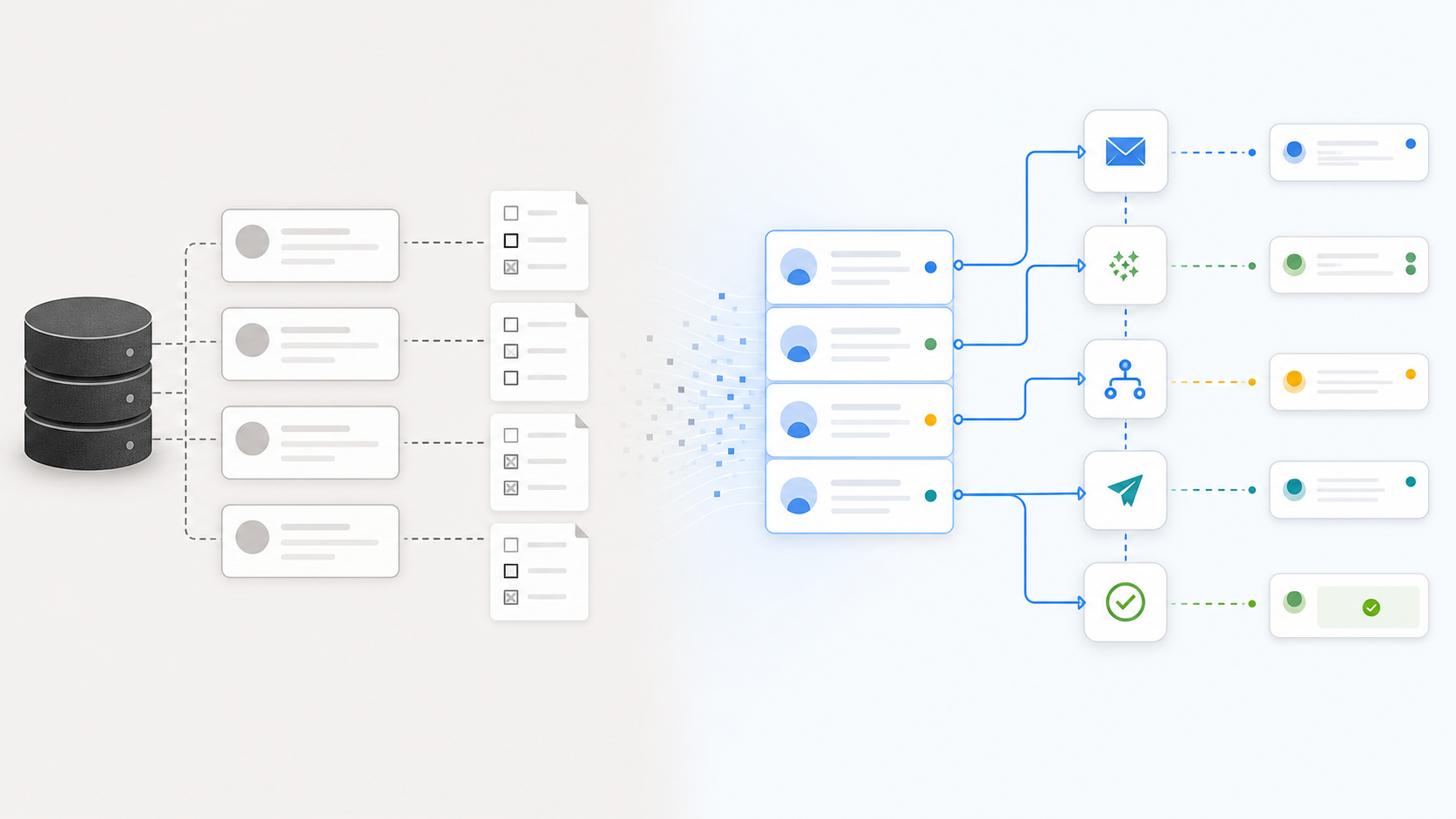
## What AI CRM software should actually do
### 1. Keep contact data usable
AI is only useful if the underlying data is good enough to act on. A CRM record with a company name, a generic phone number, and an old email address does not become useful just because an assistant can summarize it.
The system should help identify incomplete records and enrich them with better context:
- verified business emails
- direct dial or mobile numbers where appropriate
- company size, industry, location, and website signals
- role and seniority context
- source and freshness information
- suppression or compliance state
That is why contact data and CRM automation belong together. The workflow breaks when a rep has to leave the CRM, research a missing contact manually, copy the result back, and then remember to follow up.
Workbase separates this into product surfaces such as [data enrichment](/enrich/) and [our data](/enrich/data/), but the practical goal is broader: the sales workspace should make incomplete data obvious and turn usable data into action.
### 2. Understand conversations across channels
Modern sales work does not happen in one place. A lead may start from a website form, reply by email, continue on LinkedIn, and later send a message through another channel. If the CRM only stores the final note, the team loses the path that produced the opportunity.
AI CRM software should connect conversation context across the inbox and the record. That means it should understand:
- which channel the lead came from
- whether a reply needs human attention
- which owner should handle the next step
- whether the person is already in the CRM
- which deal, company, or task the conversation belongs to
This is where a [unified inbox](/inbox/) becomes more than a convenience feature. It gives the AI and the team a single place to inspect context before acting.
### 3. Turn signals into next steps
The useful output of AI CRM software is not a paragraph. The useful output is a next step that is visible, editable, and tied to the record.
Examples:
- create a follow-up task when a prospect opens a conversation but does not reply
- route a high-intent lead to the right owner
- draft a reply using the CRM context
- add a missing role or company attribute
- update lifecycle stage after qualification
- pause automation when a human conversation starts
The important detail is control. AI should not silently mutate the sales process in ways the team cannot audit. The system should show what changed, why it changed, and where a human can approve or correct the action.
### 4. Automate follow-up without making it feel generic
Follow-up is one of the highest-leverage areas for AI CRM because it is repetitive, time-sensitive, and easy to let slip. But bad automation creates a different problem: every message feels like it came from a sequence template.
Good AI CRM software should use CRM context and conversation history to decide:
- whether the follow-up should happen
- which channel is appropriate
- what changed since the last touch
- whether the message should be personal, short, or purely operational
- when the owner should review before sending
That makes follow-up automation a workflow problem, not just an email-writing problem. The system needs access to records, tasks, conversations, and routing rules.
Automated lead follow-up deserves its own workflow design because timing, routing, and CRM updates have to work together.
## A practical evaluation checklist
When comparing AI CRM software, look beyond the demo assistant. Ask whether the system can handle the operational details that actually consume sales time.
### Data and enrichment
- Can it detect incomplete records?
- Can it enrich contacts and companies without manual copy-paste?
- Does it show freshness and source context?
- Can the team define what counts as a usable record?
### Workflow execution
- Can it create and update tasks?
- Can it route leads based on rules and context?
- Can it pause when a human needs to review?
- Does it write changes back to the CRM or only display suggestions?
### Inbox and conversation context
- Can it connect email, social, and messaging channels?
- Can it attach conversations to the right record?
- Can it distinguish a positive reply from a support question or unsubscribe?
### Human control
- Can users approve sensitive actions?
- Is there an audit trail?
- Can managers see what automation is doing?
- Can the team override the system without breaking the workflow?
## Where AI CRM usually fails
The most common failure is treating AI as a feature layer instead of a workflow layer.
A chatbot beside the CRM may be helpful for quick questions, but it does not fix fragmented sales operations. If the team still has to research missing data, monitor five inboxes, manually create tasks, and decide every follow-up from scratch, the CRM remains mostly passive.
The second failure is trying to automate too much too quickly. Sales work needs judgment. The best starting point is usually not full autonomy; it is assisted execution for narrow, measurable workflows:
- enrich missing contact records
- route new inbound leads
- draft follow-ups after defined events
- summarize conversation history before handoff
- flag records that need cleanup
These workflows are concrete enough to measure and narrow enough to control.
## What to build first
If you are evaluating AI CRM software or setting up your own AI sales workspace, start with one workflow where manual work clearly creates delay.
Good first candidates:
1. New lead intake and routing.
2. Follow-up after no reply.
3. Contact enrichment for incomplete CRM records.
4. Inbox triage for sales conversations.
5. Owner handoff after qualification.
The right AI CRM does not need to replace every tool on day one. It should make one painful workflow meaningfully faster, then expand from there.
## Bottom line
AI CRM software should not just make the CRM easier to ask questions about. It should make the CRM more useful as an operating system for sales work.
The strongest systems connect data, inbox, tasks, routing, follow-up, and human review. That is where AI starts to matter: not as a novelty inside the CRM, but as a layer that helps the team move qualified work forward.
# Automated Lead Follow-Up: How to Respond Without Losing Context
Canonical: https://www.workbase.com/blog/automated-lead-follow-up/
Category: Sales
Author: Max Tiedemann
Published: 2026-05-25T00:00:00.000Z
Updated: 2026-05-25T00:00:00.000Z
A product-led guide to automated lead follow-up, covering timing, channels, qualification, routing, CRM updates, and human review.
## Why lead follow-up breaks
Lead follow-up usually fails for ordinary reasons. The lead came in through one channel, the owner works in another tool, the CRM record is incomplete, and the next step is not clear enough for anyone to act quickly.
By the time the team notices, the lead may already be cold.
Automation helps only when it solves that coordination problem. If it simply sends a generic message three days later, it may create activity without improving the sales process. The goal is not more follow-up. The goal is better-timed, better-informed, and better-routed follow-up.
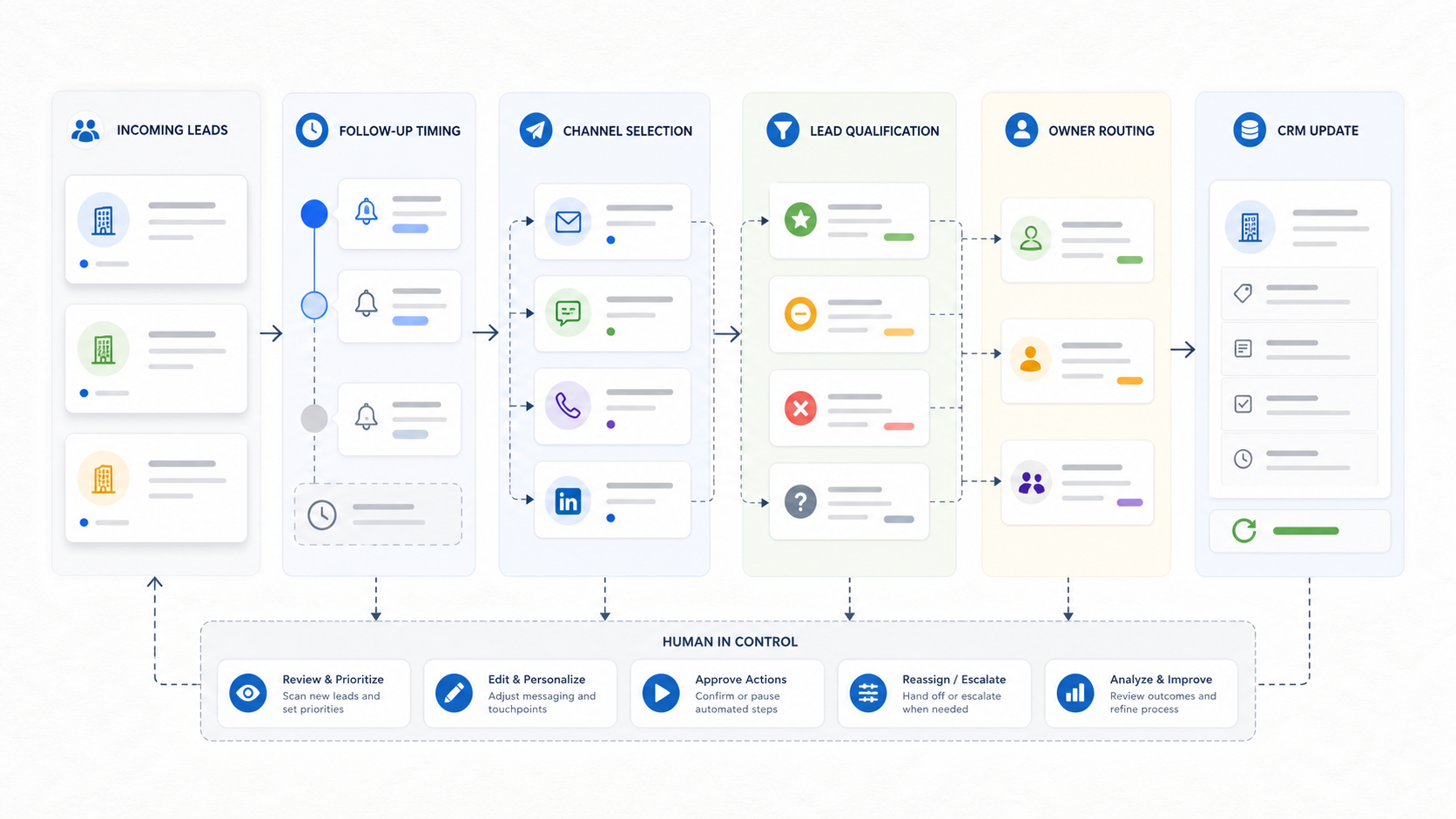
## The five parts of a useful follow-up system
### 1. Intake
Every follow-up workflow starts with a signal. That signal might come from a form, email, LinkedIn message, chat conversation, imported list, or manual CRM entry.
The first question is whether the system can capture enough context:
- where the lead came from
- what the person asked for
- which company they belong to
- whether they already exist in the CRM
- whether a previous conversation exists
- which product or page created the intent
Without this context, automation becomes blind. It can send something, but it cannot reliably decide what should happen next.
### 2. Timing
Timing rules should match the lead type. A demo request should not wait three days. A low-intent content download may not need an immediate personal reply. A reply from an existing opportunity may need the owner to pause all automated messaging.
Useful follow-up timing usually combines:
- immediate confirmation
- owner notification
- a short first follow-up window
- a longer second follow-up window
- stop conditions when the lead replies
- escalation when a high-intent lead sits untouched
The important part is not just the delay. It is the rule behind the delay.
### 3. Channel choice
Lead follow-up should respect the channel where the relationship started. If someone asked a question by email, email may be the right first touch. If a lead came from a social conversation, the system should not immediately force the conversation into a generic CRM sequence.
A strong workflow can choose between channels based on context:
- email for clear business requests
- inbox task for review-heavy conversations
- LinkedIn-style follow-up when the first interaction happened there
- phone task when a direct number is available and urgency is high
- no automated outreach when the person has opted out or suppressed contact
This is why a [unified inbox](/inbox/) matters. The follow-up system needs a place to see conversation state before it acts.
### 4. Qualification
Not every lead deserves the same follow-up. Automation should help separate clear next steps from ambiguous records.
Basic qualification signals include:
- company fit
- role or seniority
- geography
- existing customer or prospect state
- product interest
- contactability
- urgency
- source quality
The system does not need to make every judgment alone. It can mark uncertain leads for review and let a person decide. That is still automation if it removes the sorting work and makes the review queue clear.
### 5. CRM update
Follow-up automation is incomplete if the CRM remains stale. After a touchpoint, the record should reflect what happened.
That can include:
- latest outreach date
- next task
- owner
- lifecycle stage
- channel used
- contactability status
- reply status
- notes from the conversation
The CRM should not become a place where automation sends messages from the outside and leaves no trace. A good workflow closes the loop.
## A practical automated follow-up flow
Here is a simple pattern that works for many B2B teams:
1. A lead enters from a form, inbound email, message, or list.
2. The system checks whether the person and company already exist.
3. Missing contact or company context is enriched where possible.
4. The system scores the lead for fit and intent.
5. Low-risk follow-up is drafted automatically.
6. High-intent or uncertain leads are routed to a human.
7. The owner gets a task with the full context.
8. The CRM is updated after the action.
9. The system pauses if the lead replies or opts out.
10. Managers can inspect what happened and where the workflow stalled.
This is the difference between a sequence tool and a workflow system. The sequence tool sends messages. The workflow system coordinates work.
## Where humans should stay in control
Automated lead follow-up should not remove judgment from sales. It should remove avoidable delay and repetitive coordination.
Keep human review for:
- high-value accounts
- unclear intent
- sensitive industries
- legal or privacy requests
- angry or confused replies
- unusual company structures
- contacts with suppression or compliance flags
Let automation handle:
- reminders
- routing
- draft generation
- record enrichment
- CRM updates
- low-risk status messages
- task creation
This balance matters. Sales teams trust automation when they can see what it is doing and intervene before it creates risk.
## How to measure whether it works
Do not measure automated follow-up by message volume alone. More activity can still be worse if the messages are late, generic, or misrouted.
Better metrics:
- time to first meaningful response
- percentage of leads with an assigned owner
- percentage of leads with complete contact data
- reply rate by source
- meeting conversion by follow-up type
- number of untouched high-intent leads
- tasks created versus tasks completed
- opt-out or complaint rate
The metric that usually exposes the problem fastest is untouched high-intent leads. If those exist, automation should start with routing and owner visibility before message generation.
## What to build first
Start with a narrow workflow:
**New inbound lead -> enrich -> qualify -> route -> draft follow-up -> update CRM.**
That workflow is small enough to control, but important enough to matter. It also connects the core systems that make follow-up useful: CRM records, contact data, inbox context, ownership, and tasks.
From there, expand into channel-specific flows:
- follow-up after demo request
- follow-up after no reply
- follow-up after pricing page visit
- follow-up after inbound email
- follow-up after imported lead list
Each flow should have its own stop conditions and review rules.
## Bottom line
Automated lead follow-up is not about replacing salespeople. It is about making sure good leads do not disappear between tools.
The best systems combine timing, channel context, qualification, routing, CRM updates, and human review. When those pieces work together, follow-up becomes less dependent on memory and more dependent on a clear operating system.
# Direct Dial Phone Numbers for B2B Sales: What They Are and When They Help
Canonical: https://www.workbase.com/blog/direct-dial-phone-numbers/
Category: Sales
Author: Max Tiedemann
Published: 2026-05-25T00:00:00.000Z
Updated: 2026-05-25T00:00:00.000Z
A practical guide to direct dial phone numbers for B2B sales, including data quality, freshness, compliance, contactability, and CRM workflow context.
## What direct dial phone numbers are
A direct dial phone number is a number that helps a sales team reach a specific business contact or relevant desk more directly than the main company line. In practice, that may be a direct office line, a business mobile number, or a department-level number that avoids the generic switchboard.
The appeal is obvious. If a seller has the right person, the right company, and the right reason to call, a direct number can reduce friction. The problem is that direct dial data is easy to misuse when it is treated as a shortcut instead of a data-quality layer.
Direct dial numbers are not a sales strategy by themselves. They are one part of a contactability system.

## When direct dials help
Direct dials help most when a team already knows who they need to reach.
Good use cases include:
- following up with a qualified inbound lead
- reaching a buying committee member after account research
- contacting a decision-maker when email has gone silent
- verifying details for an active opportunity
- routing a time-sensitive conversation to the right person
- filling gaps in incomplete CRM records
They are less useful when the team has no clear account fit, no relevant message, and no reason for the contact to expect outreach. Better data does not fix weak targeting.
## The quality checks that matter
### 1. Accuracy
The number should actually connect to the intended person, team, or business context. Old or misassigned numbers waste time and create bad experiences.
Accuracy is not only about whether the number exists. It is about whether the number is useful for the specific sales workflow.
Ask:
- Is this number connected to the right person or role?
- Is it a personal mobile, office line, department line, or company main line?
- Does the CRM show when it was last verified?
- Is there another channel that is more appropriate?
### 2. Freshness
People change roles, companies, and contact preferences. A direct dial that was useful a year ago may be wrong today.
Freshness should be visible in the record. A sales team should not have to guess whether the number came from a recent enrichment, a stale import, or an unknown legacy source.
For contact databases, freshness is one of the most important trust signals. Workbase exposes database and coverage context through pages like [data enrichment](/enrich/) and [our data](/enrich/data/), but the principle applies to any sales stack: contact data should have a visible quality state.
### 3. Context
A direct dial is much more valuable when it sits next to the rest of the contact context:
- name and role
- company and industry
- account owner
- previous conversations
- email address
- source
- lead status
- suppression state
- last activity
Without context, the number creates manual work. The seller still has to decide who the person is, why they matter, whether they should be contacted, and what should happen afterwards.
### 4. Compliance and suppression
Sales teams need to respect applicable laws, consent rules, internal policies, and suppression requests. Requirements vary by region and use case, so the system should not encourage a simplistic "number found, call now" workflow.
A safer approach is to make suppression and review states part of the record. If a person or company should not be contacted, the workflow should make that visible before outreach happens.
This is especially important when direct dials are used together with automated workflows. Automation should make the review state clearer, not hide it.
## How direct dials fit into CRM workflows
The best use of direct dial phone numbers is not a spreadsheet export. It is a CRM-connected workflow.
A practical flow looks like this:
1. A lead or account enters the CRM.
2. The system checks whether key contacts are missing direct contact options.
3. Contact data is enriched where appropriate.
4. The record shows source, freshness, and contactability state.
5. The owner receives a clear next step.
6. Outreach is logged back into the CRM.
7. Reply, no-answer, or suppression outcomes update the record.
That makes direct dial data part of the sales operating system, not a separate research task.
## Common mistakes
### Using direct dials without a reason to call
The presence of a number does not create relevance. The team still needs a business reason, a useful message, and a clear fit.
### Treating all numbers the same
A mobile number, office line, department line, and main switchboard are not equal. The record should make the type and reliability of the number clear.
### Ignoring stale data
Old direct dials can be worse than no direct dials because they create false confidence. Freshness should influence whether the workflow suggests a call, another channel, or a verification step.
### Separating data from follow-up
If the number lives in one tool and the follow-up lives in another, the seller has to bridge the gap manually. Direct dials are more useful when they are connected to tasks, inbox context, and CRM updates.
## Article and page ideas around direct dial data
If you are building a content strategy around this topic, direct dial numbers should not be a single isolated article. They belong to a broader B2B contact data cluster:
- direct dial phone numbers
- business mobile numbers for sales
- how to verify B2B contact data
- email finder versus phone number finder
- contact enrichment for CRM records
- data freshness in outbound sales
- B2B contact database quality checklist
This cluster can support product pages around contact data, enrichment, CRM cleanup, and outbound workflows.
## Bottom line
Direct dial phone numbers can help B2B sales teams reach the right people faster. But they only create value when the team also has context, freshness, compliance awareness, and a clear workflow for what happens next.
The practical goal is not just to find a number. The goal is to turn an incomplete or hard-to-use record into a contactable, reviewable, and accountable sales workflow.
# What is really behind Leadbase?
Canonical: https://www.workbase.com/blog/leadbase/
Category: Tools
Author: Niklas Friese
Published: 2026-05-16T00:00:00.000Z
Updated: 2026-05-16T00:00:00.000Z
When sales teams come across incomplete CRM data, they often fail to make contact due to missing information or when calling the landline number directly at reception. Leadbase addresses this by automatically adding private mobile numbers and verified business email addresses to existing data records. The aim is to turn anonymous or incomplete leads into usable sales data and thus enable targeted follow-up.
## What does Leadbase do?
Leadbase provides automated data enrichment for CRM systems. The platform completes incomplete or outdated contacts with validated information such as direct mobile numbers and verified business email addresses. This gives sales teams a more reliable base for targeted outreach and follow-up.
## The path to a scalable sales operation
After the CRM setup, Leadbase starts identifying incomplete records and enriches them automatically. The process reduces manual research, keeps customer data usable, and helps sales teams spend more time on qualified conversations instead of administrative cleanup.
## Who is it relevant for?
Leadbase is built for **sales-oriented organizations of different sizes**. It can support solo operators, startups, agencies, growing small and medium-sized businesses, and established sales teams that want to improve existing CRM data without adding manual work.
With its focus on **sales intelligence**, Leadbase is especially relevant for:
- **Prospecting and sales teams** that want to prioritize leads and reach contacts more reliably.
- **Sales managers** who want cleaner CRM data for follow-up, cross-selling, and upselling.
## Conclusion
Leadbase is a practical platform that combines targeted data enrichment with straightforward CRM integration. Its automated workflows can save time and improve lead quality, especially for teams that need to turn incomplete or anonymous records into usable sales contacts.
# 5 Reasons Why Your Onboarding Strategy Isn't Working
Canonical: https://www.workbase.com/blog/5-reasons-why-your-onboarding-strategy-doesnt-work/
Category: HR
Author: Nils Kröger
Published: 2026-05-16T00:00:00.000Z
Updated: 2026-05-16T00:00:00.000Z
There are several reasons why onboarding strategies don't work. We'll show you what they are and what you need to pay particular attention to. Our experts also have the right solution to the problem.
Perfect onboarding - this can quickly lead to major mistakes. If the onboarding process is not implemented correctly, this has massive consequences.
Your employees should settle into the company quickly and feel that they are in good hands. If this is not achieved during the induction process, it is not just performance that will be affected. In the worst case, it can even lead to dismissal.
In this article, our experienced Workbase team shows you five serious mistakes that are often made during the onboarding process. If you avoid these shortcomings and approach them with the right solutions, you will be able to ensure systematic and efficient onboarding.
### What is onboarding?
In simple terms, onboarding is the process of familiarizing new employees with the company. Employees should integrate quickly, feel comfortable and perform well in a timely manner. But onboarding is much more than that.
### **Onboarding process from the first day of work**
The first important moment in the onboarding process is the first day at work. With a good onboarding strategy, your new specialist will learn the required tasks very quickly. They will then be able to complete their workload more quickly.
### **Benefits of the right onboarding process**
An optimal onboarding strategy helps you to become a popular employer among your employees. Word of employee satisfaction and identification with the company also spreads quickly beyond the company boundaries.
The benefits of good onboarding at a glance:
- Faster productivity for your new team members
- A significantly faster acclimatization period for your new specialists
- Optimal social integration into the team of your employees
- Greater motivation for your new starters in the new tasks and processes
- Identification with your company and common goals
## Onboarding process: 5 reasons why your strategy isn't working
Without the right approach to onboarding, you lose time, money and ultimately employee motivation. Find out more below about the 5 most common reasons why many onboarding processes don't work.
## Reason 1: Excessive demands on the first day of work
The first day at work is often also the first day in a new environment. Employees have to get used to the new environment, new colleagues and new processes. If they are also directly confronted with difficult tasks, this can be overwhelming and make the acclimatization process much more difficult.
In addition, employees' self-confidence is often not yet fully built up on their first day at work. They are unsure of what is expected of them and how they will fit into their new role.
Only in the rarest of cases is full performance achieved on the first day at work - or even in the first few weeks after starting.
If employees are immediately overwhelmed on their first day at work, this can affect their motivation. As a result, they find it difficult to concentrate on their work.
As a responsible manager, it is therefore advisable to give new employees time to settle in. This increases the feeling of security and appreciation towards the employee.
It is advisable to use digital onboarding tools such as an employee platform from the very first day of work. This allows employees to be systematically trained with consistent quality.
Such digital processes allow your new employees to get to know the company structures, for example. Who should they contact with what concerns? Who are their direct superiors and what is the best way to reach them?
Even simple questions can be answered with the help of short videos during the digital onboarding process. Examples include: How do I operate the coffee machine? What do I need to look out for when customers come to visit?
Used correctly, an employee platform can be worth its weight in gold. Entrepreneurs save a lot of time and money by mapping a large part of the onboarding process via the platform. With role-based training videos, training courses, checklists, wikis, exams and more, you can systematically reduce training time!
## Reason 2: Manual instead of systematized onboarding
The second big mistake why your onboarding strategy doesn't work is because your new specialists are being trained by other employees.
Of course, it is not wrong for managers or other employees to accompany the new employee temporarily, especially during the induction period. However, this onboarding strategy has many disadvantages.
### Work is left undone when team members are involved
It is highly likely that the senior manager will be tied up for the induction period. Measured against the high loss of working time, this can result in high opportunity costs.
Before you read the following questions, consider whether the answers to them could be used more pragmatically in the form of training videos in combination with tests, instead of answering them manually for each employee!
What are opportunity costs? Opportunity costs are not real costs, but lost profit. In the case of managers, they cannot generate any money for the company as long as they are tied up in the onboarding process.
### Information is not communicated correctly or is omitted
Another problem in the onboarding process for new employees is that often only fractions of information are communicated. Managers can also lose sight of processes.
Mistakes mainly happen when managers have not carried out the job in question themselves for years. In extreme cases (e.g. new working conditions), managers have no experience at all with the tasks of the new position.
However, questions are often avoided in the first few days due to uncertainty. Instead, they blindly attempt tasks that are ultimately incorrect.
Misunderstandings arise, which can lead to stress and annoyance for everyone involved. This can even lead to the new employee resigning if they feel too uncomfortable.How can this be avoided? Following on from point 1, a digital solution is the answer to this question. A systematically implemented employee platform is the perfect complement to manual onboarding.
- For example, the centralized and role-based provision of documents such as manuals, guidelines and procedural instructions means that new employees always have everything they need at their fingertips.
- Direct access to important tools and applications that make the new employee's work easier increases security.
- Last but not least, training materials and videos also help new employees to settle into their role more quickly. Digital training videos play a primary role.
- Digital checklists and queries make it easier for employees to easily review what they have learned. They and their employer receive feedback on whether everything has been understood correctly. Employees and the employer can also better assess skills. Training time is systematically reduced.
- Wikis are part of good digital onboarding. If employees are unsure about something during their work, they can find an answer in the wiki within a very short time.
Of course, a personal exchange must also take place. However, it is advisable to implement digital onboarding for all recurring tasks and processes.
As an employee platform, Workbase is precisely geared towards these goals and offers all the important functions required for digital onboarding.
## **Reason 3: Company values and expectations are not communicated correctly**
The negative consequence of a manual induction is often that company values and goals are not communicated correctly. Your new specialist should know exactly what they can expect from your company. Here are some important questions to ask:
Before you read the following questions, consider whether the answers to them could be used more pragmatically in the form of training videos in combination with exams instead of answering them manually for each employee!
What does the company do?
- Show your employees what their tasks are.
- Show your employees what your products are.
- Show your employees what their part is.
What does the company stand for?
- Communicate the company's core values to your employees.
- What support can they expect from you?
- What values does your company convey to the outside world?
Where does the company stand?
- Talk openly about the current situation on the market.
- How many colleagues will your employees soon have?
- What makes your company's products special?
What does the future look like?
- Talk openly about your company's future goals.
- Employee information about technical developments.
- Get the opinions of your employees often.
Your new employee should be able to answer questions like these later on. Your employee should understand from the outset exactly what performance or KPIs are expected of them after the onboarding process.
What does KPI stand for? KPI stands for Key Performance Indicator. It is a key performance indicator. It is used to objectively measure the work results of individual employees.
## Reason 4: No healthy feedback culture
Employees are often reluctant to give their superiors or colleagues honest, personal feedback. However, a healthy feedback culture is important because it helps to identify and solve problems at an early stage. This increases cohesion within the company.
Employee surveys can play a central role in this context. However, this option is often not taken into consideration, for example to positively influence the mood among employees.
However, deficits can easily be identified with an anonymous survey.
What are the advantages of a survey?
1. **Feedback**: Surveys offer employees the opportunity to express their opinions about working conditions, collaboration and company values. This feedback gives management important information about which aspects of the work culture are working well and which are not.
2. **Transparency**: You signal that you listen to employees' opinions and take them seriously. This increases transparency in the company and promotes employee trust in management.
3. **Comparability**: Surveys can also be used to compare the culture in your company over time and measure whether the measures taken to improve the culture are actually having an effect.
Read also: [Employee survey: 6 tips for the perfect survey](/blog/employee-survey)
### Analyze and evaluate surveys professionally
As an employee platform, Workbase offers not only the tool for creating surveys, but also a detailed analysis function.
With Workbase, you can get in touch with your employees quickly and easily, encourage them to complete the survey and receive usable results shortly afterwards.
With a properly coordinated and regular employee survey, you are always on the right side. If you do not take this into account in your onboarding strategy, this can also be a reason for failure.
## Reason 5: Onboarding is kept too short
During the onboarding process, your new specialist will soon identify with your company. This is important for the following reasons:
1. **Motivation**: when employees identify with your company, they are more motivated to do their job better and actively support the company.
2. **Loyalty**: Employees who identify with your company tend to be more loyal and stay with the company longer.
3. **Productivity**: Employees who identify with your company are more productive because they are more committed to the company's success.
In addition to cultivating a positive work culture, it is therefore a strategic task to ensure that employees identify with the company in the long term. This includes, for example, having clear goals and values that employees can share, as well as rewarding employees for their performance and offering them development opportunities.
**Onboarding is therefore not just about managing the first few weeks, but also about consistently anchoring all important learning processes over several months - ideally digitally and systematically.**
## Conclusion
With the right approach to your onboarding process, you can reliably induct new employees. In particular, show new specialists that you are the right place for them to work.
By eliminating these five basic mistakes, the onboarding process can be more successful. Workbase offers you a wider range of services than conventional software solutions.
Messages, surveys and all kinds of analyses will help you. This will help you perfect your onboarding strategy and provide your employees with the best possible support.
Digital onboarding is the technology of the future that you will use to train your specialists.
Let our experts advise you now on how best to proceed with the onboarding process. With Workbase at your side, your onboarding strategy will work.
# Amazon ASIN: Things to Know for Online Retailers
Canonical: https://www.workbase.com/blog/amazon-asin/
Category: eCommerce
Author: Niklas Friese
Published: 2026-05-16T00:00:00.000Z
Updated: 2026-05-16T00:00:00.000Z
Find out what function the ten-digit Amazon ASIN number has for online retailers and what aspects need to be considered in connection with the catalogue number.
**Without ASIN (or ISBN for books) no Amazon product:** The ten-digit alphanumeric combination identifies and categorizes all products within the range on the [Amazon marketplace](/blog/sell-worldwide-at-amazon). Also known as the Amazon Standard Identification Number, the unique code for each product ensures easy findability in the Amazon online shop and protects it from potential counterfeits. Additionally, the number groups identical products from different sellers. The ASIN is not a universal standard but is only relevant as an internal and national catalog number on the Amazon marketplace.
### Determining a Product's ASIN - A Brief Guide
Even though the ASIN is only relevant for the Amazon platform, the ten-digit number for each product can be viewed on the product page. Thus, it can also be used by customers in their product search. On the product page, you can find the specific Amazon ASIN number under the "Product Details" tab, right below the dimensions and shipping specifications.

Another way to determine a product's ASIN is to identify the ten-digit alphanumeric sequence in the product page URL. This always starts with the letter "B."
If you want to extract multiple ASIN numbers at once, you can use a range of Amazon tools that make the manual work easier.
### Generating an ASIN - Guidelines for Categorizing New Products
A new ASIN must always be generated when the newly listed product is unique in its execution within the Amazon product catalog. Sellers who wish to sell products already available on the [Amazon marketplace](/blog/sell-worldwide-at-amazon) must use the existing ASIN and create an offer. You generate a new ASIN number via the "Sell a Product" field in the [Amazon Seller Central](/blog/amazon-seller-central) interface. The creation of new Amazon ASIN numbers is subject to certain restrictions:
- **Non-**[**brand owners**](/blog/amazon-shop)**:** Sellers who are not simultaneously the brand owner must first undergo an authentication process to create a new ASIN.
- **Upper limit:** Depending on the sales history on the Amazon marketplace, the capacity for listings and ASIN creations is limited.
- **Variant policies:** When creating product variants, certain restrictions apply, determining whether a newly added product is a variant of an existing item or a completely new product with its own ASIN.

## Single or Double - Amazon ASINs for International Markets
International sellers who offer the same product in multiple countries face the choice of using a uniform number or a separate ASIN for each sales country. This is because Amazon initially stores the ASIN number only at the national level, for example, in the German market. While previously the product title and [description](/blog/amazon-productdescription) could be edited and adapted to the local language when using a uniform ASIN for multiple sales countries, [images](/blog/amazon-productpictures), [videos](/blog/amazon-productvideos), and infographics could not be. This is now possible via the following link: [https://sellercentral.amazon.de/imaging/upload/country](https://sellercentral.amazon.de/imaging/upload/country).
Therefore, it is advisable to use the same Amazon ASIN number for each sales country if it is a product that has not yet been represented in the Amazon catalog of the respective countries.
# Amazon FBA: First Steps for Your FBA Business Model
Canonical: https://www.workbase.com/blog/amazon-fba/
Category: eCommerce
Author: Niklas Friese
Published: 2026-05-16T00:00:00.000Z
Updated: 2026-05-16T00:00:00.000Z
Amazon FBA is a cooperation model that is reshaping online retail. Find out more about the principle behind it as well as the potential and the approach from the retailer's perspective.
The Online [Marketplace Amazon](/blog/sell-worldwide-at-amazon) has Significantly Transformed the E-Commerce Industry in Recent Years. An enormous product range, competitive prices compared to other providers, and successful customer retention have paved the way for this development. A key part of the success recipe of the American company is the special system known as Amazon FBA, which actively involves third-party sellers and provides them with a platform to sell their own products.
### This Concept is Known as Amazon FBA
The acronym stands for "Fulfillment by Amazon". In this case, Amazon does not merely act as an intermediary but also takes on logistics and shipping responsibilities. It doesn’t matter whether the trading partner is a newly founded single-product company or an already established trading company.
Amazon FBA promises an enormous gain in reach with millions of potential customers. Consequently, it presents an attractive opportunity for building one’s brand. The advantage lies in the fact that this can be achieved with relatively little start-up capital. The Amazon agency Conversion Studio explains the detailed process of the fulfillment concept, what aspects to consider in positioning, and the potential Amazon FBA offers.
### The First Steps for a Successful FBA Business Model
But where should interested sole proprietors start to establish themselves as FBA sellers? The prerequisite for participating in Amazon FBA is registering an Amazon seller account. This can be created similarly to a traditional customer account by providing an address, bank details, and contact information. Once this first step is completed, companies can send their inventory directly to Amazon’s logistics centers. This measure allows the international company to manage the goods.
Newly founded companies whose products are still in the manufacturing process can efficiently use the time until import. For example, by preparing a listing that presents the products attractively on Amazon. When creating high-quality [product images](/blog/amazon-productpictures), impactful headlines, and short descriptions with relevant keywords, you can rely on partners.
### Logistics and Customer Service - The Functionality of Amazon FBA
Once the products are stored in Amazon’s logistics center, they can be made available for sale on the platform. After a successful launch, the high comfort of the FBA model becomes noticeable for the seller. Storage, shipping, and returns no longer need to be managed personally. This is not only optimal for you as a seller but also offers numerous benefits to the end consumer, such as free express shipping with Amazon Prime or a perfectly organized returns service. Particularly, the "Fulfilled by Amazon" label helps your offer gain more visibility, exude seriousness, and thus become competitive. Amazon provides the following services in detail for its FBA partners:
- Storage in the Amazon logistics center
- Shipping preparation, packaging, and labeling
- Shipping with Amazon Prime
- Returns management
- Customer service in the local language
- Pan-EU shipping for internationally oriented sellers
### Optimal Reach and Strong Performance Thanks to Amazon FBA

Trading companies that distribute their products with Amazon FBA benefit from the high popularity and trust that Amazon enjoys among customers from various segments. Thanks to targeted customer retention, Amazon is often the first point of contact when a more or less concrete purchase interest exists. Not without reason, Amazon surpasses even Google in product-related search queries. The threshold for consumers when purchasing a product is also significantly lower than when selling through their own online shop.
Amazon FBA sellers strategically utilize Amazon’s omnipresence and status as a reliable service provider with fair prices. Since the listings of Amazon FBA partners appear in the official Amazon online shop, potential customers extend the same trust to you. This happens even though you, as a third-party seller, are not directly connected to Amazon. Services like free and fast Prime shipping and Amazon customer support provide the consumer with a secure feeling and offer real added value.
### What Costs and Fees Do Amazon Sellers Face?
Amazon FBA offers a range of practical advantages for sellers and, therefore, is not entirely free. In addition to the manageable monthly flat rate of 39 euros, there are also referral and shipping fees for each successful sale of an FBA product. Additionally, there are storage costs per cubic meter of storage space that your products occupy in the Amazon logistics center, although these are relatively low. Special FBA calculators can be used to calculate the expected costs and fees in advance. You can find more information in this article: [Amazon FBA Costs](/blog/amazon-fba-prices).
### Amazon FBA Seller Account Sales Plans
- Individual seller: €0 per month + €0.99 per item sold
- Professional: €39 per month + €0 per item sold
For all companies selling more than 40 items a month, the professional seller account plan makes the most sense.
### Successful Business Model with Amazon in Several Stages
Amazon FBA offers ideal starting conditions, especially for small sellers, to build a business model in the e-commerce sector, as it can be managed with relatively little capital depending on the product category. For the [Amazon FBA business](/blog/fba-instructions) to function as desired, you must go through the following stages first:
- **Positioning and Product Selection**: The foundation for good positioning is extensive product research, which culminates in the development of a Unique Selling Point (USP) and sourcing manufacturers.
- **Manufacturer Search and Product Development**: From determining suitable materials, designing appealing packaging, to issuing test certificates, you work closely with the manufacturer. A high product quality is a shared concern for both Amazon and the end customer.
- **Calculation and Ordering**: At this point, it is crucial to calculate the costs and profit margins of the product.
- **Order and Import**: After successful import, the goods can be sent directly to Amazon’s logistics center.
- **Prepare Launch**: High-quality product images and a professional listing are needed for a successful launch with maximum conversions.
- **Reinvest and Scale**: The entire process can then be repeated with an unlimited number of products to successively scale the trading company.
With extensive experience and a reliable working method, Conversion Studio accompanies your Amazon FBA business model from product research to the final launch. Send us an initial inquiry, book a free consultation, and gain a valuable partner in scaling your business model with Amazon FBA.
# Amazon FBA Costs: From Production to Commission
Canonical: https://www.workbase.com/blog/amazon-fba-prices/
Category: eCommerce
Author: Niklas Friese
Published: 2026-05-16T00:00:00.000Z
Updated: 2026-05-16T00:00:00.000Z
Amazon FBA promises a high level of convenience and attractive margins. But what are the costs in detail? Find out which one-off costs and fees you need to calculate as an FBA merchant and which factors you should use to determine the amount of your equity.
The [FBA Model](/blog/amazon-fba) from Amazon is Very Popular Among Sellers. It promises high convenience and attractive margins. In this model, Amazon provides a kind of digital [marketplace](/blog/sell-worldwide-at-amazon) for third-party providers who can sell their quality products on a large platform. From logistics to shipping and customer support, Amazon takes care of a variety of organizational tasks. However, Amazon also wants to share in the profits from product sales.
### Therefore, it is Worth Examining the Aspect of Amazon FBA Costs
What different cost factors are there in the FBA business? How can a complex calculation best be accomplished? And how accurate is the often-made claim that entry into Amazon FBA is possible with very little start-up capital? All these questions are answered by the Amazon agency Conversion Studio.
### General Costs, Product Costs, and Service Costs in Focus
To get to the bottom of the question about Amazon FBA costs, it makes sense to divide the total costs into broad categories. In the Amazon FBA business, three types of costs are particularly relevant:
- General business costs such as business registration, tax advisor, and business account
- Costs related to the product, from product development to purchasing and importing
- Amazon FBA costs for logistics and brokerage services in the form of fees and commissions

### From Product Development to Customs - An Overview of Product Costs
With Amazon FBA, products are traded that need to be developed, ordered, and imported. The bulk of the product-related Amazon FBA costs consists of purchasing the products from the manufacturer. The choice of product packaging is also not to be neglected. Their variants cover different cost segments, from the inexpensive polybag to the blister card to the high-quality color box.
There are also different price categories for importing goods depending on the logistics service provider and shipping method. While sea freight impresses with a strong price-performance ratio, higher costs are incurred for fast and efficient air freight. Customs and import sales tax costs also arise with almost every delivery. This is because most manufacturers produce abroad.
### Amazon FBA Costs for a Variety of Services
Unlike selling in your own online shop, Amazon FBA sellers also need to calculate the costs incurred for Amazon's extensive fulfillment service. In detail, Amazon charges the following fees and commissions:
- **Referral Fee**: This fee is applied as a percentage to each sold product and is 15% in most product categories. Although this value seems high at first glance, it is reasonable considering the numerous advantages of selling on the Amazon platform.
- [**Storage Fees**](/blog/amazon-fba-storageprices): Amazon FBA storage costs are determined based on the consumed cubic meter. They vary by season and product category. Maximum fees of 36 euros per cubic meter of space in the Amazon warehouse are charged. For storage within Germany, an additional fee of 50 cents per product must be paid for shipping to third countries.
- **Shipping Fees**: Since shipping to the end customer is also part of Amazon's FBA services, different costs arise here as well. These depend on size, weight, and storage location. With a total of 10 packaging options, Amazon ensures that there is a suitable shipping option for every type of product. Discounted shipping conditions are available for small and light products with a sales price under 10 euros. You can find the current tables for shipping and storage fees at this link: [Amazon FBA Shipping and Storage Fees.](https://sell.amazon.de/en/versand-durch-amazon)
- [**Returns Management**](/blog/amazon-fba-returns)**Fees**: In the event of a return, Amazon charges a processing fee of 20% of the referral fee, with the fee capped at 5 euros.
- **Amazon**[**Seller Account**](/blog/amazon-seller-central): The professional seller account increases your monthly Amazon FBA costs by 39 euros.
### The Price Question: What Start-Up Capital is Needed for Amazon FBA?
It is often heard that a small start-up capital is not an obstacle to a successful start as an FBA seller. This statement is correct to some extent because most of the Amazon FBA costs are incurred after the sale of a product due to the service fees. On the other hand, all one-time costs such as licenses and certificates and purchasing costs must be considered, which arise before the launch of the first product. A relatively small start-up capital in the four-digit range can thus be sufficient in the Amazon FBA business. However, it is not possible without any investments.
An exact recommendation regarding start-up capital is difficult as it varies greatly depending on the chosen product. To establish oneself in highly frequented product categories such as knives or pencils, higher start-up capital is required to meet the high demand by ordering large quantities. This is necessary to have sufficient stock and enough time for reorders. The same applies to products in a higher price segment. These must first be ordered from the manufacturer at a relatively high price. Start-up capital and product choice are therefore interdependent, which is why the prospective capital should also be considered during product research.

# Amazon FBA Storage Costs: Understanding and Calculating
Canonical: https://www.workbase.com/blog/amazon-fba-storageprices/
Category: eCommerce
Author: Niklas Friese
Published: 2026-05-16T00:00:00.000Z
Updated: 2026-05-16T00:00:00.000Z
If you want to get started with Amazon FBA, you need to keep a constant eye on your storage costs. Find out which parameters the storage fees depend on and how you can optimise your expenses.
Unlike traditional e-commerce, where the seller handles logistics, [Amazon FBA](/blog/amazon-fba) shifts these tasks to the American conglomerate. This does not mean that storage, shipping preparation, and final delivery costs disappear. While shipping costs can be optimized by choosing the right packaging, storage costs are more complex. Understanding [Amazon FBA's storage fee system](/blog/is-amazon-fba-worth-it) is crucial for minimizing per-[ASIN](/blog/amazon-fba-prices) storage [costs](/blog/amazon-fba-prices) and maximizing long-term profits.
### Amazon FBA Storage Costs - Product Size and Season as Parameters
How exactly are Amazon FBA storage fees calculated? Amazon uses a simple system that considers both the occupied storage space and the duration of storage. Storage fees are calculated per month and per cubic meter. You can imagine a cubic meter as a cube with one-meter sides. The volume your inventory occupies in Amazon's logistics center depends on your product's dimensions.
A unique aspect of Amazon's storage costs per cubic meter is that they can vary depending on the season. October, November, and December, due to the pre-Christmas rush, are particularly [strong sales](/blog/amazon-fba-find-products) months, increasing the demand for limited storage space. Consequently, storage costs are higher during these months to discourage [FBA sellers](/blog/amazon-seller-central) from stocking more products than necessary.
Amazon's storage fees vary yearly and can be viewed in the seller section of Amazon's website. In 2021, the monthly [costs](/blog/amazon-fba-prices) per cubic meter for Germany are as follows:
**January - September**
- Standard-size products (max. 45 x 34 x 26 cm, 12 kg): 26 Euros
- Standard-size products, clothing and shoes category: 15.60 Euros
- Oversized products: 18 Euros
**October - December**
- Standard-size products (max. 45 x 34 x 26 cm, 12 kg): 36 Euros
- Standard-size products, clothing and shoes category: 21.60 Euros
- Oversized products: 25 Euros
These rates do not apply to hazardous goods. A guide on hazardous goods can be found [here](https://sellercentral.amazon.de/help/hub/reference/external/G201003400?locale=en-US). Storage fees for a month are deducted between the 7th and 15th of the following month. For instance, January's storage fees will appear in February's billing report under transactions between February 7th and 15th.
### Calculating Inventory Properly - Tips for FBA Sellers
Optimizing storage costs can help you as an [Amazon FBA seller](/blog/amazon-seller-central) to better maximize profits. The easiest way to minimize these expenses is through professional and realistic inventory planning. It is advisable to maintain inventory levels that match your sales volume for two months. This prevents long-term storage, which incurs unnecessary storage fees.
Additionally, long-term storage fees apply to items stored in Amazon’s logistics center for over 365 days. These fees are significantly higher and should be avoided. Long-term storage fees are 170 Euros per cubic meter or 0.10 Euros per item, whichever amount is higher.
While optimizing, ensure not to fall below the two-month benchmark, as a thin inventory that might go out of stock negatively impacts the product's sales performance. Communication with the manufacturer is also crucial, as the goods need to be produced at the right pace to avoid unnecessary storage costs. A comprehensive [Amazon FBA guide can be found here.](/blog/fba-instructions)

# Find Amazon FBA Products: Strategies for Product Research
Canonical: https://www.workbase.com/blog/amazon-fba-find-products/
Category: eCommerce
Author: Niklas Friese
Published: 2026-05-16T00:00:00.000Z
Updated: 2026-05-16T00:00:00.000Z
This article shows you effective product research strategies that you can use to find profitable and successful Amazon FBA products and build a lucrative FBA business.
With the vision of the "Everything Store," founder Jeff Bezos has turned Amazon into the most successful [online marketplace](/blog/sell-worldwide-at-amazon) for all kinds of physical products. The giant platform offers independent sellers the opportunity to become active as [FBA sellers](/blog/fba-instructions) and expand the product catalog with their own offerings. However, given the extensive range of products from technology to dietary supplements and the high density of offers, many sellers wonder which niche and product have the most potential.
## Demand and Start-Up Capital - Factors for Product Selection
With the right Amazon FBA product ideas, you lay the foundation for optimal performance of your online business long before concrete product development and marketing begin. The selection of suitable products depends heavily on the demand for that product category on Amazon and the seller's own start-up capital. While particularly popular product categories like umbrellas or protein powders require a very high start-up capital due to high competition, small niches can be played with relatively low investment. Conversely, however, these categories generally do not achieve groundbreaking sales, so product selection also depends on the seller’s sales goals.
To find suitable Amazon FBA products, it is worth conducting extensive market and competitor research. Ideally, the product category you choose should be dominated more by private label sellers than by major brands, as well-known brands enjoy a trust advantage among potential customers. The factors that determine whether entering a particular product niche is worthwhile include sales, profit margins, but also the quality of [product images](/blog/amazon-productpictures) or [videos](/blog/amazon-productvideos), the [listing](/blog/amazon-productdescription), and customer reviews. By performing a detailed analysis, you can identify market gaps for high-quality products and develop unique selling points (USPs) for your product. One useful tool for this purpose is JungleScout. The goal should always be to offer the best product available on Amazon in its category and price range.

## Brainstorming - Finding Potential Amazon FBA Products
To find ideal Amazon FBA products, one method has proven particularly effective: research, research, and more research! By immersing yourself intensively in various niches and product worlds, you get a comprehensive overview of interesting products with great potential. These strategies can also help you find successful Amazon FBA product ideas:
- **Interests as a Starting Point**: Start with your own areas of interest and hobbies to identify product categories where you may already have some prior knowledge and expertise.
- **Retail and Specialty Stores**: If a particular niche interests you, browse through the assortments of specialized stores to find potential Amazon FBA products.
- **Trade Shows**: Industry-specific trade shows are also excellent for discovering modern and unconventional Amazon FBA product ideas.
- **Best Sellers**: The best seller list on Amazon provides the [most successful products](/blog/amazon-improve-ranking) in each market niche that the online marketplace has to offer.
- **Similar Products**: Recommendations on Amazon product pages offer a way to find sponsored and related products from the same niche.
## Making the Right Decision with Good Research and Calculation
After the initial brainstorming sessions, where Amazon FBA product ideas are gathered, the selection needs to be narrowed down in the next steps to eventually crystallize the ideal product. By analyzing existing Amazon listings using tools like JungleScout, you can estimate the sales volume of a comparable product. It is worth analyzing both the number of sales and the performance over time. Products that are very seasonal are generally not suitable for starting your own [Amazon FBA](/blog/amazon-fba) business.
The performance of related products in the same niche provides insight into expected sales and revenue. To be successful with a similar product on Amazon, you must also develop your own USPs that distinguish the new product and set it apart from the competition. Finally, a detailed and realistic product calculation is required to find the perfect Amazon FBA products. Special FBA calculators help with balancing revenue, product costs, and service fees.
# Amazon FBA Returns: Manage Returns Professionally
Canonical: https://www.workbase.com/blog/amazon-fba-returns/
Category: eCommerce
Author: Niklas Friese
Published: 2026-05-16T00:00:00.000Z
Updated: 2026-05-16T00:00:00.000Z
Learn all about the professional management of Amazon FBA returns and benefit from proven strategies for minimising the returns rate.
Even if it is not the most pleasant part of selling on Amazon, managing returns is an important aspect of being an [FBA seller](/blog/amazon-seller-central). Every product sold on Amazon can be returned to the seller within 30 days if the customer changes their mind or is not fully convinced by the product. During certain times (such as Christmas), this period is extended by Amazon. For the customer, the possibility of a return is an essential and legally secured privilege, as it allows them to physically evaluate the purchased product before making a final decision. However, for the [Amazon FBA](/blog/amazon-fba) seller, returns are rather unfavorable side effects that can come with high costs. But how exactly does the Amazon FBA returns system work, and how do [Amazon FBA sellers](/blog/amazon-seller-central) manage to keep the return rate particularly low?
### Fulfilled by Amazon - FBA Returns and the Process Behind It
Compared to e-commerce models based on dropshipping or their own online shops, Amazon FBA sellers have it particularly easy when it comes to returns. The reason: the management of Amazon FBA returns falls under Amazon's responsibility, which handles all activities related to storage, shipping, and returns management as part of the fulfillment system. If the buyer decides to return the ordered item within the specified return period, Amazon handles the entire process, so the seller does not have to become actively involved. Since Amazon aims to be the most customer-friendly company in the world, it often accepts returns - sometimes months or years later - that legally would not have to be taken back. However, this is determined by Amazon in these cases. As a seller, you should therefore pay attention to certain factors to minimize the likelihood of this happening.
### Amazon FBA Returns - The Product Condition is Decisive
All packages received at Amazon's return center are inspected by the company's employees for their condition and assessed for their resaleability. This classification is particularly important as it determines the further path of the Amazon FBA returns. Three different categories of products emerge from this:
1. **Resalable Products**: Products that are in perfect condition.
2. **Non-Resalable Products**: Products whose condition does not qualify them for resale.
3. **Non-Sellable Products**: Products that have been damaged and/or lost due to an error in Amazon's logistics and transportation system.
In all three cases, the customer is fully refunded the originally paid amount, including the shipping costs. Amazon is particularly lenient and often accommodates customers even if the return does not fully comply with the return conditions. The seller is always refunded the sales fees that they must pay to Amazon for each sold FBA product.
While resalable products are directly reintegrated into the Amazon inventory system, sellers have two options for non-resalable products. They can either have Amazon destroy the items or have the unsellable product sent back to them. If the decisive error for the non-sellability of the product lies within Amazon's storage and delivery chain, the seller also receives an appropriate replacement value for their [Amazon FBA returns](/blog/amazon-fba-returns).
### A Low Return Rate as the Key to Sustainable Success
Professional returns management and the extended 30-day return period are not only a necessity but also a selling point. Potential customers are ultimately willing to order the [product](/blog/amazon-fba-find-products) for a trial even if they are not yet sure. Amazon's fulfillment service gives the customer a sense of security, as all [returns](/blog/amazon-fba-storageprices) are handled professionally, reliably, quickly, and seriously. This positively impacts your product's sales figures. Nevertheless, it is essential to keep the return rate as low as possible to be sustainably successful as an Amazon FBA seller. Here are some points you can implement:
- **Fast Shipping**: If you do not ship products through FBA, ensure to ship them as quickly as possible. The longer the customer waits for their order, the more likely they are to return it.
- **Product**[**Images**](/blog/amazon-productpictures)**and**[**Descriptions**](/blog/amazon-productdescription): Analyze why the customer is returning the product. If there was a misunderstanding (e.g., the customer thought a camera included a battery), this should be clearly communicated in the images or an appealing [product video](/blog/amazon-productvideos).
- **Reviews**: Negative reviews often indicate why customers dislike the product and return it. Adjust the product according to the feedback or clarify it better in the content on the product detail page.
- **Customer Support**: Include a friendly and personal card and/or flyer, so the customer can easily contact you as the seller in case of problems (before returning the product), making it easier to find a solution.
By following these strategies, Amazon FBA sellers can effectively manage returns and maintain a low return rate, leading to long-term success on the platform.

# Amazon Product Description: Tips for Effective Listing
Canonical: https://www.workbase.com/blog/amazon-productdescription/
Category: eCommerce
Author: Niklas Friese
Published: 2026-05-16T00:00:00.000Z
Updated: 2026-05-16T00:00:00.000Z
Find out everything you need to know about how to optimise your listing with a professional Amazon product description and improve the performance of your product in this way.
Optimizing the [listing](/blog/amazon-seo-optimization) is one of the key strategies to turn a high-quality product into a true bestseller on Amazon. Besides well-known listing elements such as the title, bullet points, and [product photos](/blog/amazon-productpictures), the importance of a good product description is sometimes overlooked.
In reality, however, the product description is a great opportunity to convince potential customers of your product while also taking a step forward in [SEO optimization](/blog/amazon-seo-optimization). It is important to always use A+ Content instead of the classic product description.
### A Good Amazon Product Description - More than Just SEO and Keywords
From an SEO perspective, an Amazon product description can be designed similarly to the title or bullet points. Here too, a balanced distribution of the main and secondary keywords determined in advance is essential. But simply stringing together the generated keywords does not make for a good Amazon product description. Instead, you can use the description text as potential to engage the buyer and convince them to make a purchase on both a content and emotional level. Readability and natural text flow are much more important in an Amazon product description than an overly high keyword density, which is also recognized by Amazon's modern SEO algorithm.
### Product Descriptions with Added Value - Strategies for Strong Texts
To ensure that the content of an Amazon product description resonates with the reader, you need to convey not only dry content but also emotions. An appropriate way to start a description text is with a compact and memorable slogan that captures the potential buyer’s interest and encourages them to read on. In the following sentences, you can describe the problem your product promises to solve. Marketing specialists also like to construct problems that the reader may not have been aware of previously.
The features and USPs of the product can then be presented as solutions to the described problem. Alternatively, you can illustrate the desirable scenario that purchasing your product makes possible for the customer. However, be sure to be concise to avoid losing the reader. Every good Amazon product description ultimately leads to a call to action, which directly addresses the potential customer and encourages them to purchase the product.
Additionally, using larger, well-designed text in image modules can capture attention. [Videos](/blog/amazon-productvideos) in the product description also tend to convert well.
Here is a summarized form of the optimal structure of an Amazon product description:
- **Slogan in the First Sentence**: A slogan that piques curiosity
- **Problem Description**: Describing a real or constructed problem (can also be in video form)
- **Product Presentation**: Presenting the product as the solution to the described problem
- **Sales Argumentation**: Highlighting the most important USPs of the product
- **Call to Action**: A call to action that ideally leads to a purchase
### Creating A+ Content
To create this type of product description, you need to be the owner of a registered brand. If you are, follow these steps:
1. Open [Amazon Seller Central](/blog/amazon-seller-central)
2. Click on "Advertising" and then "A+ Content Manager"
3. Click on "Create A+ Content" in the top right
4. Select either "Basic" or "Premium" on the left and then click "Create"
5. Here, you can choose various modules and design the A+ Content accordingly
Premium A+ Content offers more and better-designed modules but comes at an additional cost per [ASIN](/blog/amazon-asin).
# Amazon Product Images: Most Important Factors for Optimal Conversion Rate
Canonical: https://www.workbase.com/blog/amazon-productpictures/
Category: eCommerce
Author: Niklas Friese
Published: 2026-05-16T00:00:00.000Z
Updated: 2026-05-16T00:00:00.000Z
In the following sections, you will learn how to optimise sales figures on Amazon for a high-quality product with professional photos.
Strong Amazon product images generate attention and convince potential customers of your offer. When a customer searches for a product on Amazon, the title image largely determines whether they click on the offer. Therefore, Amazon product photos play an especially important role as they directly and vividly convey the product's unique selling points (USPs).
But what makes good Amazon product images, and should you opt for a professional [agency](/blog/amazon-seo-agency) or product photographer instead of taking the pictures yourself with your DSLR camera? The answer depends on the specific case, but the advantages of excellent Amazon product images are undeniable. A professional listing that impresses at first glance of the title image significantly increases the chances of [high sales figures](/blog/amazon-improve-ranking).
### The Three Levels of Successful Amazon Product Images
Strong Amazon product images are characterized by three features:
1. **Photo Level**: High resolution, professionally set lighting, and expertly executed post-processing suggest that a high-quality product is behind the high-quality photo.
2. **Content Level**: The most important functions, USPs, and features of the product are clearly explained through the images, making it unnecessary to look at the bullet points. The right but concise text should be used in the images.
3. **Emotions Level**: Good Amazon product images convey emotions and create a strong desire for the product. This is a very important part that many Amazon sellers neglect. Primarily, application images with people using or looking at the product are very suitable for this.
### The Amazon Style Guide - The Basis for Optimal Performance
Even though Amazon product photos can be designed relatively freely, there are some formal requirements from Amazon. These serve to maintain uniformity in the online shop, as multiple listings from different sellers are always found on one page. These three guidelines are particularly important for Amazon title images:
- At least 80% of the image must be filled with your [product](/blog/amazon-asin).
- The background must be a solid white area. The image can also be edited afterward to be set against a white background.
- Neither text nor logos or design elements are allowed on the title image, although the packaging, which can usually be printed freely, can be shown. This can be used to your advantage with an eye-catching design or color.
For all other images, white backgrounds should be avoided as much as possible since they generally look boring. Texts and various seals can be used in these images.
### Optimizing Your Listing with High-Quality Amazon Product Photos
A maximum of seven product photos are displayed in a listing on Amazon. If a video is present, only the first six images are shown. The title image is of particular importance as it represents your listing and the high-quality product. Despite the Amazon style guide, there is an opportunity to positively stand out from the competition at first glance through skillful use of perspective and a unique look. If you want to build your [own brand](/blog/amazon-shop), it is advisable to design the title images of your product range uniformly to increase recognition value.
The next three images should then go into more detail and ideally present the most important USPs of your product in a clear manner. The final images should be application photos that convey special emotions and thus further increase the chances of sales. Whether setting, models, or montage - anything is allowed that presents your product attractively but not exaggeratedly. Less is sometimes more.
### Amazon Product Images - Quality and Staging are Crucial
Excellent quality forms the basis for strong Amazon product images. Recently, images in the 4:5 format with a resolution of 3000 x 3750 pixels have proven particularly effective, as they are extremely sharp even when zoomed in. The new portrait format allows for a larger display of images in many categories. Additionally, the setting should be optimally and naturally lit so that all [product](/blog/amazon-shop) details are clearly visible. Irregularities, dust particles, and other flaws can be professionally retouched in post-processing to make the product image perfect. A professional photographer can also add reflections and shading in post-production to give the photo a natural look.
Another exciting aspect concerns the staging of Amazon product images. Present the product in an interesting setting, such as a kitchen or sports theme, in its context of use. Alternatively, use models to communicate size proportions or show how the product looks when worn. Lastly, Amazon product images can also be enhanced by incorporating the product packaging.
# Amazon Product Videos: Marketing in a Class of Its Own
Canonical: https://www.workbase.com/blog/amazon-productvideos/
Category: eCommerce
Author: Niklas Friese
Published: 2026-05-16T00:00:00.000Z
Updated: 2026-05-16T00:00:00.000Z
This article reveals how you can best use Amazon product videos to significantly optimise your listing and increase the conversion rate.
Imagine yourself in the perspective of a potential buyer. Are you more drawn to a lengthy text or a compact and atmospheric product video? Most likely, you would choose the latter. But what exactly makes an adequate Amazon product video, and what techniques can be used to attractively showcase a high-quality [product](/blog/amazon-asin)?
### Generating Attention and Convincing Buyers with Amazon Product Videos
Product videos are a popular marketing tool for [Amazon sellers](/blog/amazon-seller-central), gaining popularity for various reasons. On one hand, they generate attention and keep potential customers on the product page of your listing longer. On the other hand, they are a significantly more effective medium than a long continuous text or extensive [bullet points](/blog/amazon-productdescription). A video can succinctly highlight the most important USPs of a product, optimally present usage scenarios, and also spread positive emotions. Moreover, product videos are excellent for advertising in Amazon search results, a strategy not yet widely utilized by many sellers.
### Amazon Product Videos - Selling Emotions Instead of Facts
The biggest advantage of Amazon product videos is that the format is ideal for conveying emotions. The potentially dry facts and product specifications can be presented in an understandable, vivid, and accessible way in a video, reaching more potential customers. The target person unconsciously starts to identify with the product and brand, imagining themselves owning and using the product. Not only can the functions and USPs of the product be showcased effectively in a video, but a well-crafted video clip also strengthens the perception of your brand. For example, incorporating your brand's corporate identity into the video design can enhance memorability and [brand](/blog/amazon-shop) identification. The video should match the style of the [product images](/blog/amazon-productpictures).
### Diverse Design Possibilities for Amazon Product Videos
With various video styles ranging from classic commercials to hand-drawn animations, there are no creative limits for Amazon product videos. The key is to optimally and emotionally communicate the unique selling points, functions, and features of your product to stand out positively from the competition. This can include short keyword overlays, subtle background music, sound effects, or a narrative voice. Note that sound is typically disabled for classic video ads in Amazon search results, so the video should convey all essential information without sound.
### Amazon Product Videos - Keep it Simple, Keep it Short
Creating a compelling product video often requires less effort than one might initially think. Well-conceived and concise spots of just a few seconds can reinforce a potential buyer’s decision to order your product. Instead of endless sequences and an overload of effects and information, you and your video team can focus on essential content and designs to highlight the product. Such a minimalist Amazon product video appears particularly professional and enhances your perception as an Amazon seller.
### Benefits of a Professional Amazon Product Video - An Overview
The most relevant advantages of an Amazon product video are summarized below:
- **Compact and Clear Visualization**: Highlighting the functions and USPs of your product in a clear and concise manner.
- **Emotional Impact**: Creating an emotional connection with potential customers.
- **Positive Effect on Amazon Listing Optimization**: Enhancing the visibility of the product.
- **Numerous Design Possibilities**: From atmospheric commercials to explanatory animations.
- **Increased Attention and Brand Identification**: Engaging more attention and fostering a stronger identification with your brand.
# Improve Amazon Ranking: Three Ways to the Top Position
Canonical: https://www.workbase.com/blog/amazon-improve-ranking/
Category: eCommerce
Author: Niklas Friese
Published: 2026-05-16T00:00:00.000Z
Updated: 2026-05-16T00:00:00.000Z
With these concrete insights and valuable tips, you will be able to improve your listings in terms of Amazon ranking.
### Improving Amazon Ranking - Three Ways to the Top Position
Put yourself in the shoes of a buyer who wants to quickly and easily find the needed product on Amazon. Do you scroll to the end of the entire product range, or do you trust the first results recommended by Amazon? Since most people choose the latter, an [optimal ranking position](/blog/amazon-seo-optimization) is crucial for Amazon sellers.
Amazon ranking optimization involves improving the position of a listing in the search results for a specific main keyword on Amazon. This requires understanding the basic functionality of the A9 algorithm, which determines the relevance of a listing for the customer based on various parameters.
### Improving Amazon Ranking with Optimal Sales Performance
To improve Amazon ranking, an above-average sales performance for individual keywords is required. Sales volume and the generated revenue are calculated, compared with competitors, and used to develop a ranking. The key to a high ranking on Amazon is, in a way, to bring an [excellent product](/blog/amazon-fba-find-products) to market that convinces potential customers, gets purchased, and generates revenue.
If you feel that your product needs a little push to gain more visibility, Amazon’s PPC campaigns are an optimal choice. These paid advertising campaigns increase traffic to your listing by boosting its position in the [Amazon ranking](/blog/amazon-improve-ranking) through ads. Effective advertising can also be placed for your [brand store](/blog/amazon-shop). This way, your listing and brand reach more Amazon users, leading to more sales and greater revenue, which in turn boosts your organic ranking.
### SEO - Improving Amazon Ranking through Optimized Listings
A good listing that appeals to customers already positively impacts sales performance, the most crucial factor for a high Amazon ranking. It gets even better when relevant keywords for the product are integrated into the listing in an SEO-friendly manner. Extensive keyword research and competitor analysis are necessary to create the keyword list with the highest search volume.
How keywords are integrated into the listing is also crucial. To improve Amazon ranking, the most important keywords should be found in the first words of the title and the backend. Additionally, a professional listing design and high-quality product images should not be neglected. Key points include:
- **Bullet Points**: These should be a maximum of 1000 bytes long (about 1000 characters). Short and clear benefits should be highlighted in CAPS at the beginning.
- **Product Images**: These are extremely important. Except for the main image, a white background should not be used. Instead, always use real lifestyle and application images. Additionally, each image should show a main benefit with short and large text. Images that evoke emotions in the customer are also essential.
- **Reviews**: An average of 4.5 stars and a few hundred to a thousand reviews (depending on the competition) is optimal. The effective MDC method can be used for more reviews.

### Fine-Tuning Amazon Ranking with Soft and Account Factors
Soft and account factors can also improve Amazon ranking, although not as significantly as sales performance and search engine optimization. But what exactly are these soft and account factors? These are smaller, yet crucial characteristics that distinguish reputable sellers with high-quality products. They include:
- Short response times in the question section under the listing as well as in personal contacts.
- Fast shipping, for example through the use of [Amazon FBA.](/blog/amazon-fba)
- Low return rate, ideally less than 3 percent depending on the product category.
- A broad product portfolio and a brand store.
- Consistently sufficient stock.
- Timely invoice payments for seller fees and PPC.
- Long-term positive sales history.
By focusing on these strategies, Amazon sellers can significantly improve their rankings, ensuring higher visibility and increased sales on the platform.
# Amazon Seller Central: Selling Successfully
Canonical: https://www.workbase.com/blog/amazon-seller-central/
Category: eCommerce
Author: Niklas Friese
Published: 2026-05-16T00:00:00.000Z
Updated: 2026-05-16T00:00:00.000Z
Amazon Seller Central allows businesses to manage aspects of their sales such as inventory, pricing, orders and more on Amazon.
### Selling Your Own Products: A Guide to Amazon Seller Central
Whether you are a professional seller or want to make some extra money from your hobby, building and managing your own online shop involves a significant amount of effort. This is especially true if you want to sell not only your own products but also items from third parties. Amazon Seller Central offers an alternative to a standalone online shop, requiring significantly less effort and financial resources. Besides the lower effort, Amazon Seller Central provides another advantage: you benefit from the Amazon brand and the advantages it offers for your products.
### What are the Advantages of Amazon Seller Central?
As a platform for various sellers, Amazon Seller Central offers numerous advantages, leaving little to be desired for sellers. The main advantages of Amazon Seller Central are quickly summarized:
- **Quick and Free Registration**: You can register quickly and for free.
- **User-Friendly Tools and Listings**: The integrated tools and simple listings make it easy to sell your items.
- **Efficient and Secure Payment Processing**: This benefit applies to both sellers and customers.
- **Free Seller and Advertising Tools**: You have extensive functions for statistics and analysis.
While these advantages make a strong case for Amazon Seller Central, there are naturally other alternatives besides Amazon and Seller Central. Nevertheless, additional points favor using Amazon Seller Central, making the platform a profitable element for online sellers. You don’t necessarily have to be a professional seller; even if you want to make some extra money from your hobby, Amazon Seller Central is the right choice. In addition to the reasons mentioned earlier, here are more benefits that Amazon Seller Central can offer:
- **Trust Advantage**: Amazon seems to be everywhere and offers exceptional service to its customers. This trust is automatically projected onto sellers using an Amazon account to sell their goods, for instance, through Fulfillment by Amazon.
- **Familiar Processes**: When buying and paying for products, customers prefer familiar processes. Amazon has standardized automatic procedures, contributing to customer satisfaction.
- **Amazon Marketing**: Another advantage of Amazon Seller Central is access to existing marketing tools on Amazon, including targeted email campaigns, Vine, and the Subscribe & Save program. If it pays off for you, you can advertise your product there to achieve even better visibility.
- **Higher Sales Potential**: Selling through Amazon Seller Central increases your conversion rate, enhancing the recognition and popularity of your products on Amazon.
- **Reduced Effort**: A significant advantage of Amazon Seller Central is that it reduces your effort. Amazon handles logistics and returns management, freeing up time for other endeavors.
### Unlocking Growth Potential with Amazon Seller Central and Conversion Studio
In our consultations, we often find that many companies are unaware of their growth potential with Amazon Seller Central or how to unlock it. This is where we come in. In a free initial consultation, we offer a current state analysis and derive the next steps from the state of our clients' marketing activities and previous work. We work with our clients to develop a strategy and implement it as a team. Regular performance monitoring, support, and optimization ensure our clients' success and their growth on the Amazon marketplace.
### Is Amazon Seller Central Right for You?
Are you just starting your career? Do you currently not have your own online shop and have only managed to attract a few customers? In such cases, among others, you benefit from trusting Amazon's seller platform. The company offers you a vast customer base and various advertising tools to reach your customers. The platform's simplicity makes it an ideal entry point for beginners and inexperienced sellers.
However, it's not just for beginners: those who prefer to manage and control things themselves also benefit from the platform. While you can independently handle a wide range of tasks and settings, you can easily outsource the really difficult and time-consuming aspects. Additionally, you benefit from the trust that the public already has in Amazon. The security, coupled with the simple and partially automated processes, contributes to an optimal and pleasant experience for your customers. For this reason, the choice to purchase almost always falls on Amazon, even if a product is available from other providers.
Even if the company regularly faces criticism, it is this popularity and familiarity that encourage shopping on this platform. As a seller on Seller Central, you also benefit from this reputation. Currently, there are more than 500 million products available for purchase on the platform in Germany alone. This makes it the number one platform for online shopping, and it is foreseeable that this fact will not change anytime soon.
### Amazon Seller Central: Easily Manage Your Amazon Shop
Amazon Seller Central is essentially a sales platform provided by Amazon, where you can sell your own products. Third-party sellers can also list, sell products, and use Amazon as a [marketplace](/blog/sell-worldwide-at-amazon). All that is required is a free registration, which can be completed in a few minutes.
### Controlling Reach
With Amazon Seller Central, you can determine the reach of your product. For example, you can focus solely on the domestic market, participate in other European markets, or [sell worldwide with Amazon](/blog/sell-worldwide-at-amazon). The unique aspect is that you don’t need comprehensive language skills to offer your goods abroad.
### Saving on Storage Costs with Fulfillment by Amazon
Another reason many sellers choose Amazon Seller Central is product sales. By opting for [Fulfillment by Amazon](https://sell.amazon.de/en/online-verkaufen)(FBA), you no longer need a large warehouse. Simultaneously, you avoid the effort associated with shipping, while you and your customers benefit from Prime advantages.
You also benefit regarding payment methods with Amazon Seller Central. While on the open market you might not always know if you will receive your payment, with the US giant Amazon, you are assured. You can always be certain that you will be paid for your goods. [Learn more about the costs of Amazon FBA here.](/blog/amazon-fba-prices)
### Simple and Intuitive Design
Another major advantage of the platform is its intuitive and straightforward design. You don’t need advanced skills, as might be the case with your own online shop. Instead, you can use the available tools, for instance, to check your statistics or redesign your product descriptions. In any case, you can rely on Amazon to help present your product in the best possible light. Whether or not you use the offered tools is up to you. If you prefer to start your own analysis, that’s no longer a problem. This way, you are not bound and can choose the program that suits you best and that you trust the most.
As a cockpit for your [Amazon FBA](/blog/amazon-fba) sales, Seller Central offers everything you need to optimally use the platform. Instead of regularly checking and controlling your own inventory, you can conveniently outsource this task to the US company. While the company’s employees take care of this and inform you when another delivery is due, you can focus on more important tasks. This includes further developing your existing products, creating new items, and enjoying the regained free time. This way, outsourcing your inventory benefits both your buyers and yourself: your buyers enjoy Prime benefits and fast delivery, while you can relax and unwind.
### How to Sell Products via Amazon Seller Central
With an active Amazon seller account on Amazon Seller Central, many doors open for you. Once you have set up all settings regarding payment, shipping, and branding, you can start selling your products immediately. The simple process of Amazon Seller Central, which even beginners can master in no time, benefits you.
To make an optimal impression, you should rely on Amazon Seller Central’s listings. Essentially, you have different approaches on Amazon Seller Central. One option is to offer very cheap products to entice customers to buy. However, in most cases, it is better to have the best listing in a niche. You don’t necessarily have to sell the cheapest product there. In most cases, you can expect higher sales through your Amazon Seller Central account this way, as your customer knows they are not getting cheap goods.
By the way, creating a good listing on your Amazon Seller Central account has a lot to do with the right keywords in the backend. Customers generally do not see these keywords. However, you enter them into your Amazon Seller Central account so they can work in the background. They influence whether your product is visible for certain search terms. This makes the keywords particularly important ranking factors for the Amazon Seller Central platform.
Do you want to increase the number of visitors to your products and thus boost your sales? Your chances of success are good if you conduct extensive research on the most important keywords. You can also assign this task to a specialist who knows what matters in terms of search volume. You then enter the targeted keywords into Amazon Seller Central to ensure the algorithm evaluates them as desired. To ensure this works as well as possible, you should incorporate these keywords into both the bullet points and the individual descriptions.
- **Ease of Use**: Once you have set up your Amazon seller account on Amazon Seller Central, you can start immediately. The platform is very easy to use, so you can create your listings quickly and easily. Use the available tools to simplify the process between you as the seller and the customer.
### How Does Amazon Seller Central Work?
To use Amazon Seller Central, you must first register for free. This registration is completed within minutes, allowing you to start creating listings and selling your products right away. Although the Amazon Seller Central platform is easy to use, its functionality is not self-explanatory. Therefore, the following explains what is important in Amazon Seller Central and what you should pay attention to.
### Amazon Seller Central: Payment
Once you register your Amazon account on Amazon Seller Central, you must enter your payment details as a seller. This allows Amazon Seller Central to know your data and can transfer payments from buyers directly to your account. Alternatively, you can also enter a credit card. The advantage of a credit card is that it earns you additional bonus points during transactions.
If advertising costs arise, you can either offset them directly with Amazon or have them deducted from your sales. Which option you choose depends on your own preferences. However, note that separate billing results in a higher cash flow. This, in turn, affects the bonus points your credit card provider pays you. This approach is not mandatory - you can also simply link a regular account if you.
### Reduce Your Shipping Effort
Want to use [Amazon FBA](/blog/amazon-fba)? In this case, you can configure settings to optimize your shipping. If you add the "Fulfilled by Amazon" setting, you can provide additional information to enhance your shipping process. For example, if you only want to sell domestically, storing goods in other countries for PAN-EU shipping isn't beneficial. Instead, disable this feature. Focusing on domestic sales also has another advantage: you won't be taxed in other countries. The reason is that once Amazon Seller Central stores and sells your products abroad, you as the seller will be associated with these goods and must pay tax automatically. Therefore, you should gain some experience and initially focus on domestic sales if you are just starting with Amazon Seller Central. You can expand your international presence later.
### FBA - Fulfillment by Amazon: How Amazon Shipping Works
FBA stands for Fulfillment by Amazon. This means placing your products on Amazon's marketplace and delegating tasks: Amazon handles storage, packaging, and shipping of your products. The result is that you save time, which you can easily devote to other tasks. Marketing tasks and developing new products no longer need to be pushed to the background.
While you benefit from the [Amazon FBA program](/blog/amazon-fba), Amazon Seller Central also provides advantages for your customers: they can directly use the free Prime shipping and, if necessary, contact Amazon's customer support. Additionally, [Amazon FBA](/blog/amazon-fba) allows you to offer a broader range of products. But how does Fulfillment by Amazon actually work?
In the first step, you send your inventory to Amazon. Shipping is then handled by Amazon, ensuring central storage, quick retrieval, and dispatch. Amazon can guarantee that your products are shipped according to Prime delivery conditions, even if sold through Amazon Seller Central. This approach offers enormous potential, which you shouldn't miss out on within Amazon Seller Central.
### Managing Returns with Amazon Seller Central
Equally important are the preparation settings on Amazon Seller Central. Ideally, you should activate the option "Refurbish Unfulfillable Customer Returns." If not activated, dirty or damaged packaging may be returned to the seller or completely destroyed.
If the products themselves are damaged upon return, refurbishing them is usually not possible. If activated, the remittance process applies, which means that damaged products that can no longer be refurbished are either returned to the seller or handed over to Amazon. If sent to Amazon, they can be either destroyed or donated. You can easily set up this remittance process as an automated form on Amazon Seller Central, ensuring that you don't have to manually enter details for each product.
### Registering Brands on Amazon
Do you have a registered brand? In this case, you should also [register](https://brandregistry.amazon.de/) the brand with Amazon. Although this process involves a bit more effort, it simplifies creating listings afterward. As a seller on Amazon Seller Central, you also benefit from a wider range of advertising options, Amazon Vine, and associated brand protection.
### Good Rankings: Essential on Amazon Seller Central
Good listings determine whether you succeed on Amazon Seller Central. They are a central element in Amazon's algorithm, which collects millions of data points daily to decide where to place which offers and the relevance of each result in a search query. This makes the algorithm highly complex, offering few ways to influence it directly.
Whether your product ranks well depends on various factors. For example, the number of sales impacts where your product is placed in the list. You cannot influence this value on Amazon Seller Central since artificially boosting sales figures doesn't work. The Amazon Seller Central algorithm now recognizes such tricks. Instead of focusing on heavy discounts and neglecting promotions, you should influence your Amazon Seller Central where possible.
This includes choosing the right keywords and not neglecting a high number of appealing images. Ultimately, the image's task on Amazon Seller Central is to send an impulse to the buyer and invite them to click. Ideally, combine a good selection of attractive images with a meaningful and appealing title. This attracts new customers and helps your buyer understand the type of product you are selling on Amazon Seller Central and what to expect. The unique aspect: this approach conveys a sense of customer orientation, positively affecting your sales on Amazon Seller Central.
### Basic Account or Professional Seller?
When you choose Amazon Seller Central, you have two options for offering your products: the professional seller account or the basic account. The professional account, also known as a power seller, offers completely different possibilities. The reason for two types of accounts on Amazon Seller Central is simple: Amazon strives to meet the needs and requirements of both small and large sellers.
### The Basic Account:
The Basic Account on Amazon Seller Central is especially suitable if you are a smaller seller, typically selling less than 40 items per month. Since the Basic Account has no base fee, you incur no costs for Amazon Seller Central if you make no sales in a month. Only when you sell an item does Amazon take a commission. Of course, the commission amount and your product price determine the cost-benefit factor of this Amazon account. For very high-priced products sold through Amazon Seller Central, the ratio may exceed its optimum after just a few sales. Therefore, the number 40 should be considered a guideline and average for your sales via Amazon Seller Central, which may vary in your specific case.
### The Professional Account:
The Professional Account is an Amazon account mainly aimed at professional sellers. If you sell more than 40 items per month, Amazon considers you a professional seller, and you should use the professional version as your Amazon seller account. The base fee for this Amazon account is currently 39 euros per month. This means for you as a seller: the more you sell per month, the higher your sales volume, and the more profitable and optimal the cost-benefit ratio for this Amazon seller account on Amazon Seller Central.
# Amazon SEO Agency: The Guarantee for a Top Ranking
Canonical: https://www.workbase.com/blog/amazon-seo-agency/
Category: eCommerce
Author: Niklas Friese
Published: 2026-05-16T00:00:00.000Z
Updated: 2026-05-16T00:00:00.000Z
SEO is an essential factor for successful sales on Amazon. This article explains how a professional Amazon SEO agency works and the benefits of their comprehensive services.
A professional Amazon SEO agency offers a comprehensive service around the search engine optimization of Amazon listings. This includes not only the research and definition of relevant keywords but also the SEO-compatible formulation of texts for the listing. Since some search queries and product placements are not directly made through Amazon’s search bar but through general search engines, an Amazon SEO agency also improves your ranking position on Google and other search engines.
Many Amazon sellers hand over these time-intensive tasks, such as competitor research, keyword list compilation, and working with SEO tools, to an experienced Amazon SEO agency. This allows them to focus optimally on their core business, the development and manufacturing of products.
### Keyword Research and SEO Listing - How an Amazon SEO Agency Works
With an efficient workflow, a professional Amazon SEO agency optimizes each of your listings, even before the release of a new product. A specific [approach](/blog/amazon-seo-optimization) has proven successful, applied by most reputable Amazon SEO agencies, which looks like this:
- **Definition of the Main Keyword**
- **Finding Synonyms and Alternative Spellings as Secondary Keywords**
- **Consideration of Gender-Specific, Seasonal, and Regionally Popular Keywords as well as Misspellings**
- **Competitor Analysis**: Extracting keywords used by competitors based on ASINS
- **Creation of a Complete Keyword List Using Special Amazon SEO Tools**
- **Manual Editing and Improvement of the Generated Keyword List**
Next, it’s about transferring the compiled and manually improved keyword list into an optimized listing while optimally addressing potential customers. To create a listing recognized by Amazon’s A9 algorithm as particularly relevant and thus ranked high, SEO agencies rely on specific SEO guidelines and their own experience. The following aspects are considered:
- **Formulation of a Concise and Meaningful Product Title**: This includes the main keyword right at the beginning
- **Bullet Points and Description Texts**: These combine a high keyword density with a natural flow of reading
- **Integration of Special Phrases and Adjectives Outside the SEO Area**: These are proven to promote sales
- **An Optimized Backend**: The most important [keywords](/blog/amazon-seller-central) are reiterated here
## Conclusion
Potential customers find Amazon listings not only via the search mask on the Amazon website, but also by entering the relevant keywords in search engines such as Google. An Amazon SEO agency creates the optimal conditions for your listings to be found in the top search results on Google. For example, a special link is scattered as the source text of the listing on comparison portals, blogs and in social media to increase relevance for the search engine algorithm.
In this way, not only the direct visibility but also the indirect reach of the listing is significantly increased. Topics such as the optimization of [storage costs](/blog/amazon-fba-storageprices) are also very interesting.
# Amazon SEO Optimization: From Keyword Research to Listings
Canonical: https://www.workbase.com/blog/amazon-seo-optimization/
Category: eCommerce
Author: Niklas Friese
Published: 2026-05-16T00:00:00.000Z
Updated: 2026-05-16T00:00:00.000Z
A9 algorithm, keywords, listings - this article serves as an introduction to Amazon SEO optimization and explains what is behind the often-heard marketing terms.
Without visibility on the [online marketplace](/blog/sell-worldwide-at-amazon), there are no sales and therefore no revenue. But how do listings appear at the top of search results for potential customers? The answer is Search Engine Optimization, or SEO. By optimizing the listing with relevant search terms, known as keywords, a large reach can be built, leading to more sales.
Since SEO is likely a well-known term for your competitors as well, small details make the difference in Amazon SEO optimization. Generally, it comes down to two factors: the most important keywords, especially the main keyword, must be appropriately identified, and the defined keywords must be correctly integrated into the listing.

### Keyword Research - Successful Amazon Marketing Even Before the Launch
The foundation of successful [Amazon SEO optimization](/blog/amazon-seo-agency) is extensive keyword research. From the perspective of potential customers, it is essential to filter out the search terms that should make your offer appear as high as possible. The most crucial keyword is the main keyword, which should be the most common designation for the offered product and the term with the most search queries.
Many product names have several synonyms that can vary by gender or region. In most cases, it makes sense to choose two to five synonyms as secondary keywords, as they are less frequently searched but still more common than the main keyword. Research through other online shops and practical online tools is ideal for finding synonyms. Even variations of the main keyword with incorrect spelling can prove to be effective secondary keywords.
With a good base of manually filtered keywords, you can use a computer-aided tool or an [agency](/blog/amazon-seo-agency) for Amazon SEO optimization to efficiently and accurately select additional keywords. Various third-party programs intelligently link products and keywords, also considering actual search queries on Amazon. By entering the [ASINs](/blog/amazon-asin) of main competitors into a search mask, their keywords can also be analyzed. Amazon SEO tools provide a list of computer-generated keywords as output, which can then be manually refined by removing irrelevant and incorrect keywords.
### Implementing Insights - Integrating Keywords into the Amazon Listing
The second step of Amazon SEO optimization involves integrating the specifically tailored keyword list into the Amazon [listing](/blog/amazon-productdescription). It is not very effective to integrate every single keyword into the text forcefully. Instead, the focus should be on a natural flow of reading, subtly incorporating the most important search terms. Despite Amazon SEO optimization, the listing should still reach your target audience, as search engine optimization should never come at the expense of value. The following sections of the listing are particularly relevant for Amazon SEO optimization:
- **A Thoughtful Headline**: A good product title directly contains the main keyword.
- **The First Words of the Title**: Often, potential customers see only the first few words of the title on the search page.
- **The Backend**: The available 250 characters should be used to include the most relevant keywords once again.
# Amazon Brand Store: Build a Brand Store and Generate Reach
Canonical: https://www.workbase.com/blog/amazon-shop/
Category: eCommerce
Author: Niklas Friese
Published: 2026-05-16T00:00:00.000Z
Updated: 2026-05-16T00:00:00.000Z
Find out about the advantages of an Amazon store compared to conventional e-commerce and how the goal of setting up your own Amazon store can become a reality.
An Amazon Brand Store (also known as a Brand Page, Brand Store, or simply Amazon Shop) is a popular marketing tool for registered brands to increase the reach of their products and, consequently, generate more sales. The advantages of an Amazon Brand Store are clear, as [Amazon](https://www.amazon.de/?language=en_GB) is a world-renowned platform known for quality and reliability. But how exactly does the Amazon Shop system work, what about commissions, and what steps must sellers follow to build an Amazon Brand Store?
### The Amazon Brand Shop - A Small Showcase on the Digital [Marketplace](/blog/sell-worldwide-at-amazon)
Essentially, an Amazon Shop is set up just like a classic online shop with its own website. Sellers can create structures, form categories, and design layouts using a modular system according to their needs and preferences. High-quality images, wide banners, and SEO-optimized description texts complete the professional Amazon Shop.
Trading physical products on Amazon can be done through two different models. In the classic model, you as the seller handle logistics and timely shipping yourself. The so-called Fulfillment by Amazon (FBA) is also very popular. For a set fee, Amazon takes care of services such as storage, packaging, and fast shipping with Prime. Especially for beginners who do not yet have access to a professional infrastructure for logistics and shipping, [Amazon FBA](/blog/amazon-fba) provides relief.
### Search Engine Optimization and Services - The Advantages of an Amazon Brand Store
As mentioned earlier, sellers who create an Amazon Shop from their products and brand benefit from the giant reach of the corporation. In return for a sales commission, Amazon allows you to partake in a piece of the big pie. When examined in detail, an Amazon Shop offers numerous other advantages compared to classic e-commerce with your own website:
- **Search Engine Discoverability**: With an SEO-optimized Amazon Shop, it is much more likely that your brand will rank high on search engines like Google for relevant keywords.
- **Trust**: Customers trust a certain quality standard with products from Amazon Shops, which positively influences their purchasing decision.
- **Numerous Advertising Options**: Besides PPC campaigns limited to Amazon's website, it is also possible to advertise an Amazon Shop externally via search engines.
- **Custom Design**: You can personalize and tailor your Amazon Shop to your brand quickly and easily.
- **Cross Selling**: If you want to enter Amazon with multiple brands, you can skillfully link them together and multiply your customer base.
- **FBA Advantages**: With [Amazon's FBA service](/blog/amazon-fba), you no longer need to handle logistics and shipping matters, allowing you to focus entirely on your core business.
### Building a Successful Amazon Brand Store - Here's How
If you want to build an Amazon Shop, you can follow a specific sequence of steps:
1. Register your own brand
2. Create an Amazon seller account and wait for approval
3. Create the Brand Store with the Store Builder and make general settings
4. Design and structure the homepage
5. Add content such as SEO-optimized description texts, product photos, and banners
6. Fine-tuning, final adjustments, and error corrections
7. Submit the finished shop for approval to Amazon
Once the newly created Brand Store has been reviewed by Amazon for compliance with Amazon guidelines, correct links, and proper spelling, nothing stands in the way of a successful release. To give the freshly created Amazon Shop a little boost, various marketing tools are available:
- **Paid Advertising Campaigns**: For improved ranking on both Amazon and search engines
- **Discount Campaigns**: Possibly including seasonal discounts
- **Influencer Marketing**: On social media platforms like Instagram and YouTube
# FBA Guide: Getting Started in Online Retail
Canonical: https://www.workbase.com/blog/fba-instructions/
Category: eCommerce
Author: Niklas Friese
Published: 2026-05-16T00:00:00.000Z
Updated: 2026-05-16T00:00:00.000Z
From business registration to product launch - this FBA guide explains in detail which steps make it easier to start a profitable online business with Amazon FBA.
Amazon's Fulfillment by Amazon (FBA) service is particularly popular among e-commerce beginners. It combines maximum freedom and high success potential with a great deal of convenience. The US-based company makes trading physical products easier by taking care of storage, proper packaging, and shipping products to the end consumer.
Thanks to Amazon's vast online [marketplace](/blog/sell-worldwide-at-amazon) reach, sellers can quickly achieve scalable success. But how exactly do you start an Amazon FBA business? What steps are involved in listing a product on the Amazon shop, and what pitfalls should beginners avoid? This FBA guide provides answers to these questions and more helpful tips.
### Three Stages to a Successful Amazon FBA Business
We break down the process of starting with [Amazon FBA](/blog/amazon-fba) up to the first launched product into three stages, which should be completed sequentially, but sometimes also in parallel:
1. **Preparation**: This includes bureaucratic tasks such as registering a business, opening a business account, and applying for an EORI number, which are prerequisites for starting an FBA business.
2. **Product Development**: In this stage, you choose a product category, position yourself in the market, and find a manufacturer to develop detailed solutions. This stage concludes with the import of the ordered products.
3. **Marketing**: To launch your products via Amazon FBA, you must register as a professional seller on Amazon. With high-quality [product images](/blog/amazon-productpictures), [product videos](/blog/amazon-productvideos), and an optimized listing, you can further enhance the potential of Amazon FBA.
### What Preparation Do Sellers Need for a Successful Business Model?
First things first: for a successful Amazon FBA business, some paperwork needs to be handled initially, similar to any other entrepreneurial activity. These preparations serve the purpose of enabling you to trade products under your brand, as is the case with sellers on Amazon's online [marketplace](/blog/sell-worldwide-at-amazon). The following steps are particularly important:
1. **Registering a Business**: As a sole proprietor or, for a large FBA business with a starting capital of €25,000, possibly directly as a UG (limited liability company) or GmbH (limited liability company).
2. **Opening a Separate Business Account**: To best separate private and business finances.
3. **Filling Out the Tax Registration Questionnaire**: With professional help from the relevant tax office if needed.
4. **Applying for a VAT Identification Number**: Even for small business status.
5. **Applying for an EORI Number**: Which allows the import of samples and products into the EU.
### The FBA Guide for Product Development and Import
Once all the preliminary conditions are clarified, it’s time to decide what type of products you want to sell via Amazon FBA. Extensive product research is worthwhile to find market niches with high demand and insufficient supply. After positioning yourself in the market, you contact potential manufacturers to develop a product, including its packaging. After a comprehensive product calculation and applying for all necessary certifications, the finished products can finally be imported and stored in the Amazon warehouse.
### FBA Guide - Final Steps on Amazon
Our FBA guide is completed by the final steps you need to take on the Amazon platform. To become active as a seller on Amazon, you need to register with [Amazon Seller Central](/blog/amazon-seller-central). It is advisable to choose the professional plan directly for €39 per month so that your Amazon FBA business is not subject to limitations. [Here](/blog/amazon-fba-prices) you can learn more about Amazon FBA costs. To increase reach and conversion rate, professional product images and an optimized listing on Amazon are also recommended. With these preparations, nothing stands in the way of the successful launch of your first product.
# FBA Coaching: The Guide to a New Business in E-Commerce
Canonical: https://www.workbase.com/blog/fba-coaching/
Category: eCommerce
Author: Niklas Friese
Published: 2026-05-16T00:00:00.000Z
Updated: 2026-05-16T00:00:00.000Z
With an FBA coach, you can achieve a successful online retail business step by step, according to the promise of these providers. Here you can find out what makes a good coaching program and what knowledge can be imparted by an FBA coach.
The Amazon FBA Model is Highly Popular Among Ambitious [Sellers](/blog/amazon-seller-central). It provides even small retailers with the opportunity to sell their products through the popular online [marketplace](/blog/sell-worldwide-at-amazon) without having to handle logistics or product shipping themselves. But how exactly does one start with this popular e-commerce model? And what steps lie between the first product idea and a successful top-seller on Amazon? An FBA coach helps primarily FBA beginners with fundamental insights and practical tips.
### Suitable for Beginners - The Various Benefits of FBA Coaching
In theory, all the information needed to start an [Amazon FBA business](/blog/amazon-fba) is already available somewhere on the internet. The problem is that in practice, this information is difficult to find and must be compiled from many different sources through extensive research. This process leaves a certain uncertainty regarding the reliability of free websites and online guides.
A professional FBA coach makes it easier for complete e-commerce novices to set up an online business with Amazon FBA by providing bundled knowledge in a concrete way. The information is prepared in a compact and easily understandable manner, resulting in a significant learning effect in a relatively short time. Thanks to appealing visualization, the knowledge conveyed by an FBA coach is also clear, structured, and accessible.
### Sounds Good! But What Content and Knowledge Do FBA Coaches Provide in Detail?
With FBA coaching, you receive an initial [overview](/blog/fba-instructions) of all relevant topics related to Amazon FBA. Some examples include:
- The basic functioning principle of Amazon FBA
- Information about services, [storage costs](/blog/amazon-fba-storageprices), and other [fees](/blog/amazon-fba-prices)
- Practical tips for market research to find suitable products for localized market gaps
- A step-by-step guide on finding manufacturers and product development
- Legal aspects such as product certificates and customs numbers for importing into the EU
- The process of importing from abroad and transporting goods to the Amazon warehouse
- Tips for creating a listing, launching, and running PPC advertising campaigns on Amazon
- Assistance with [returns](/blog/amazon-fba-returns) and bureaucratic matters related to Amazon FBA

### FBA Coach - The Interface Between Theory and Practice
A good FBA coach combines the conveyance of specific theoretical knowledge as a foundation with practical tips for immediate implementation. Since business models with Amazon FBA vary by product category and many individual factors influence success, having as direct a personal contact as possible is essential. This aspect differentiates a professional FBA coach from typical video courses, which are usually [cheaper](/blog/amazon-fba-prices) but far less effective. The reason is the ability to receive appropriate assistance with individual problems.
### Which Reputable Providers Are Available?
There are many providers of FBA coaching, but unfortunately, there are also many unreliable ones. Therefore, you should carefully examine what the providers have done so far and whether they make money by selling on Amazon themselves or just by offering the coaching. Important criteria include:
- The FBA coach successfully sells on Amazon (at least several seven-figure annual revenues)
- There are genuine customer reviews of the provider
- The provider can be contacted personally (one-on-one), not just through group live calls
Such coaching usually makes sense only if you are still at the very beginning and have never gained experience in e-commerce. If you already have five-figure monthly sales, these coachings are mostly irrelevant. In this case, feel free to contact us for a free initial consultation.
# Scalable business or big risk - Is Amazon FBA worth it?
Canonical: https://www.workbase.com/blog/is-amazon-fba-worth-it/
Category: eCommerce
Author: Niklas Friese
Published: 2026-05-16T00:00:00.000Z
Updated: 2026-05-16T00:00:00.000Z
Amazon FBA is known as a simple and effective method for building a successful online retail business. Amazon's comprehensive fulfillment service, which takes care of all logistics and shipping tasks for the seller, is particularly attractive for beginners. In return, fees and commissions are paid to Amazon for providing the platform and logistics activities. So how worthwhile is the Amazon FBA business compared to traditional e-commerce and what opportunities does the system offer to achieve high profits in the long term?
### Worry-Free Service - The Benefits of Amazon FBA
Compared to traditional online retail, Amazon FBA offers an attractive kickstart, mainly due to the large potential customer base that comes with the high recognition and popularity of the US-based company. Initially, it doesn’t matter which segment your product is positioned in. The free Prime shipping for buyers through Amazon and the fast Amazon customer support are additional strong arguments for potential customers to choose a product from an [FBA seller](/blog/amazon-seller-central). On the other hand, when products are sold through an independent online shop, more effort is required to gain the trust of the target audience. Products on Amazon are associated with a certain quality standard.
### Saving Time and Resources with Amazon FBA
Amazon FBA is not only beneficial for quickly and inexpensively achieving considerable reach but also helps conserve capacities and resources in your online business. Since Amazon provides the personnel and infrastructure for storing, labeling, and shipping your products, you can fully focus on your core competencies. Amazon’s staff also handles returns management and customer support for every FBA item. Therefore, instead of focusing on organizational tasks, you can concentrate on careful product development and effective marketing to achieve long-term success as an [Amazon FBA](/blog/amazon-fba) seller. Consequently, Amazon FBA can even be compatible with a traditional full-time job, which is especially helpful during the startup phase.

### Personal Responsibility and Decision-Making - The Basis for Long-Term Success
Compared to a traditional online shop, which involves hosting and building a website, organizing logistics, and high advertising costs, [Amazon FBA](/blog/amazon-fba) requires less initial investment as startup capital. Instead, a commission of about 15% is charged on each sale. There are also service costs for the storage space used, shipping, and any returns. However, staff is still needed to develop new products or ensure smooth support. Training these employees can be done through a [staff platform.](/) To minimize the risk of failure, careful product research and realistic pricing calculations are also necessary before launching the product on Amazon. [Here](/blog/amazon-fba-prices), you can learn more about [Amazon FBA](/blog/amazon-fba-prices) costs.
### Amazon FBA - A Promising Model for Ambitious Sellers
Whether Amazon FBA is worth it cannot be answered universally, as success on a platform like [Amazon](https://www.amazon.de/?language=en_GB) depends on numerous factors. Those with little background knowledge who neglect important aspects such as product research and price calculation will have little long-term success on the platform. Follow these tips to stand out against the significant competition on the Amazon marketplace:
- **Use Data-Driven Analyses**: The best decisions are made based on numbers and facts. These should be carefully calculated and evaluated to minimize risks.
- **Reinvestment**: Especially in cases with low startup capital, profits should largely be reinvested in expanding the business. Product development and marketing are crucial levers here.
- **Quality Standards**: Ensure top-quality products to lay the foundation for long-term good performance. High-quality standards lead to high customer satisfaction, positive reviews, and an [attractive listing position](/blog/amazon-improve-ranking).
# Employee Survey: 6 Tips for the Perfect Survey
Canonical: https://www.workbase.com/blog/employee-survey/
Category: HR
Author: Nils Kröger
Published: 2026-05-16T00:00:00.000Z
Updated: 2026-05-16T00:00:00.000Z
Employee surveys are a valuable tool for gaining important insights into the current situation in the company. In this way, employees can provide direct feedback.
### The Results of an Employee Survey Can Be Used to Increase Employee Engagement
Consequently, they can also serve to optimize productivity within the company. For employee surveys to provide helpful insights, they must be professionally set up and conducted. Ideally, they should also be anonymous, as employees often do not respond honestly otherwise. Through the Workbase [employee platform](/), companies can easily create these surveys.
### Your Benefits from an Employee Survey:
- You can use the feedback from your employees to improve processes within the company.
- You can identify the strengths of your company from the employees' perspective and find out what needs improvement.
- You can give employees the feeling of being involved and thus an important part of the company.
- You promote communication among your employees.
### What Are Employee Surveys?
Employee surveys are often conducted regularly across the entire workforce and can include questions about satisfaction with various aspects of working in the company. As part of continuous feedback management, they help the HR department assess and improve employee engagement.
They can also be short surveys like "Do you know someone who could also work with us?" to acquire potential new employees. There are various possibilities. At Workbase, we have some proven survey templates that can be sent to all employees with just one click.
### Making Your Employee Survey a Success
For your employee survey to be a full success, two parameters are crucial. Firstly, the percentage of participants in relation to the total team size plays a role. Secondly, the quality and usability of the answers are important.
To [motivate the workforce](https://www.mz.de/varia/mitarbeiter-onboarden-und-motivieren-so-geht-s-richtig--3361512) to regularly participate in employee surveys and ensure high-quality responses, various methods can be employed:
- **Digital Tools**: Use the employee platform to conduct surveys particularly quickly and efficiently. Employees are notified of a new survey, which appears at the top of the newsfeed and remains there until the survey is completed.
- **Good Communication**: Explain why employees should participate in the survey.
- **Anonymous Surveys**: It is important that many surveys guarantee and communicate complete anonymity of responses. Workbase employee surveys ensure this with one click.
- **Simple Process**: Employee surveys should be easily accessible and understandable.
- **Proper Evaluation**: Even the best answers from your employees are useless if they are not adequately evaluated and utilized.
### Creating the Perfect Employee Survey - 6 Key Tips
Digital tools like the Workbase employee platform allow you to create an employee survey with just a few clicks. However, you should also know how an optimal employee survey should look to derive concrete results from it.
### Tip 1: Open or Closed Questions?
Before creating a survey, you should be clear about what insights you want to gain from it. The choice of questions plays a very important role in this.
An open question allows your employees to write their answers comprehensively. An example might be: “How do you personally perceive the mood in the company?”
A closed question specifies the answer options and their number: “Would you take the bus instead of the car to work? Yes / No / Maybe.”
Closed questions are generally better for surveys as they are easier and quicker to evaluate. The employee survey itself is also much faster and more enjoyable for the employee. The disadvantage, however, is that the “personal touch” is missing, and some aspects might not be covered in the survey.
### Tip 2: Never Impose a Valuation
You must never dictate how your employees should answer a question in the survey. For example: “We think the food in the canteen is very good. How delicious do you find it?”
Such a question influences employees before they decide. The answer is not representative as it does not reflect their free opinion. Depending on the survey's design, they might not even have the option to say they don’t like the canteen food.
It is better to phrase the question neutrally: “Do you like the food in the canteen?” Employees can freely and openly respond without being pushed towards an answer.
### Tip 3: Handle Negative Answers
As an employer, when asking questions, you must also allow space for negative answers. This is particularly important for closed questions, as your employees cannot describe their personal experience.
Your employee survey should not only include answers like “excellent / very good / good” to the question “How do you find the collaboration with your colleagues?” but also options like “average / poor / terrible.” Only then will you get meaningful results.
Although this sounds logical and is somewhat exaggerated here, this mistake is still often made in practice.
### Tip 4: Avoid Double-Barreled Questions
Nothing is worse than confusing your employees with the first question. This will result in poor responses to your employee survey.
An example of what not to do is double-barreled questions. It gets particularly awkward if the double-barreled question addresses two or more unrelated topics: “How do you like your office, what do you think of the company car, and when should the Christmas party be held this year?”
It is better to divide such questions into three separate ones. When designing your employee survey, you should also organize the questions by topics. A question about the company car might fit better with one about the parking situation rather than the office.
### Tip 5: Develop Creative Surveys
You might know the feeling when you read the same words over and over again in every sentence. It gets tiring, right?
The same effect occurs with your employees if they repeatedly face the same questions in your employee survey: “How do you get along with your colleagues? How do you rate your office equipment? How do you like the coffee?”
Be creative, ask the questions differently, and use synonyms.
### Tip 6: Systematically Evaluate Results
The best employee survey is useless if it is not properly evaluated. Workbase offers an integrated evaluation tool where multiple interesting data points can be viewed for each survey. Other tools also offer limited evaluation functions - use them!
Especially when employees' wishes and criticisms are quickly implemented, this is particularly well received and encourages them to take the time for future surveys.
### Benefits of Regular Employee Surveys:
- **Retain Your Employees**: Instead of constantly searching for new ones, keep your team intact.
- **Improve Well-Being**: A simple yet effective way to do something for the workforce.
- **Increase Appreciation**: For better cooperation within your company.
### Survey Results: Useful for Employees and Customers
Employee surveys can help you identify many problems and deficiencies within the company. Improving employee morale can also enhance the onboarding of new employees. New hires will appreciate not facing issues that have already been addressed following your employee survey.
Better communication within the company not only helps your employees but also positively impacts customer satisfaction. Motivated employees are not only cheerful with each other but also friendly to your customers. Your clients will appreciate it.
Through the Workbase employee platform, you are always on the safe side when seeking precise answers to existing issues within the internal culture. The employee survey is just one of the many functions that Workbase offers you.
## Conclusion
If you want well-trained employees who are loyal to your company, use a survey to find out what they think about your company or feel they are not sufficiently trained.
Are you looking for a clear basis to justify decisions in your company? In this case, you can add specific questions that are geared precisely to your goal.
Your employees are leaving your company and you don't know exactly why - use a survey to find out.
Employees come to you and stay with your company because of your values. But which values are these? An employee survey will give you an insight into this so that you can shine with your values when recruiting.
Employee surveys are a powerful tool for increasing satisfaction in your company and thus boosting productivity and performance.
However, simply conducting an employee survey is not enough to actually achieve a positive effect. Rather, the way in which the survey is conducted is crucial.
The Workbase employee platform offers the ideal solution with many templates for professional employee surveys. If you are interested in our versatile and flexible software solution, don't hesitate and [try Workbase.](/pricing)
# Employee Platform: What You Need to Know About It
Canonical: https://www.workbase.com/blog/employee-platform/
Category: HR
Author: Nils Kröger
Published: 2026-05-16T00:00:00.000Z
Updated: 2026-05-16T00:00:00.000Z
The Workbase employee platform is the perfect tool for organizing work in your company. It brings together everything your employees need for their job in a clear and structured way in one central location. The employee platform makes it possible to systematize onboarding, create smooth internal processes and ultimately increase the productivity of your employees. Optimize and professionalize your company with the Workbase employee platform.
### Rethinking Employee Training with the Employee Platform
The employee platform allows both employees and freelancers to be digitally trained in a simple and direct way. Through modern e-learning technologies, selected content can be made accessible, and self-created content on relevant topics can be shared with the team.
### Flexible and Efficient - The Benefits of the Employee Platform
Using an employee platform offers numerous benefits to employees on various levels. These include:
- **Productivity**: Through intuitive UI design and practical e-learning functions, your employees achieve higher productivity and efficiency.
- **Flexibility**: The employee platform enhances your employees' flexibility, as the service can be used independently of time. Digital training sessions can be flexibly integrated into individual schedules.
- **Location Independence**: Whether at home, during a train ride, or traditionally in the office - the employee platform is continuously available and enables flexible work both in presence and remotely.
- **Cross-Device Functionality**: The employee platform works across devices and mobile, such as on a company mobile phone.
- **Personalized Company Feed**: Workbase serves as an internal homepage for your employees, combining all relevant and current information about the company at a glance. This feed is personalized by an algorithm to show employees exactly what is relevant at the current time.
- **Security Standard**: The Workbase system has a "Made in Germany" security standard, ensuring that all sensitive data is protected in compliance with GDPR.
### Efficient and Uncomplicated - Benefits for Managers
Not only does the performance of your employees significantly improve with the use of an employee platform, but managers and trainers also benefit from the numerous potentials and easy handling of Workbase. These are the advantages for administrators using an employee platform:
- **Usability**: Operating the employee platform is particularly easy and understandable even for digital novices. Setting up content and analyzing results works through a self-explanatory interface without any coding required.
- **Customization**: Managers can design both the content and the layout of the employee platform according to their preferences and the needs of the employees.
- **Time-Saving**: It takes only five minutes to provide the first training session on the platform for your team.
The [employee platform](https://unternehmer.de/marketing-vertrieb/293499-mitarbeiter-plattform) also makes it easier for managers to effectively train their employees, showcasing an efficient and goal-oriented way of working where digital tools are used as useful and time-saving instruments.
### Creating Custom Training Content and Exciting Insights for Maximum Learning Success
Agencies, coaches, and service providers simplify and make interactions with their employees more direct and efficient through Workbase. Administrators can create and provide individual content.
The digital employee platform not only covers the allocation and provision of knowledge. With detailed insights and reports, you as a manager can measure your employees' learning success, how well they have passed exams, and stay updated on their progress.
### Custom Designs with a Modern Look and Feel in Your Corporate Identity
Workbase is designed as a white-label solution, allowing for individualized design. Choose from various modern templates and personalize them with your company's corporate identity. Colors and logos can be easily adjusted, making the employee platform a unique digital hub for your company.
An individualized design enhances your employees' sense of belonging and improves your company's identity. An appealing design with optimal overview and high usability is already provided - you just need to adapt it to your company's needs in simple steps.
### Get Started Now - The Workbase Employee Platform
With the Workbase employee platform, you achieve optimal training results with minimal effort. At the same time, you offer your employees a flexible way of continuing education and create a shared digital identity through a personalized company feed.
On the platform, employees find not only an overview of company news but can also participate in surveys and complete exams. All these functions come with useful analyses and insights, to which you, as an administrator, always have access.
## Conclusion
Benefit from the numerous advantages of the employee platform and start into the future of corporate culture today. Workbase gives you all the freedom you need to create a personalized learning experience for your employees. See for yourself and get to know Workbase and its practical functions in a demo!
If you would like to find out more about Workbase and the potential of the employee platform, sign up for our management newsletter [managment-newsletter]. Are you interested in integrating Workbase as an employee platform in your company? Then book a non-binding initial consultation with our team of experts. [Book an appointment] We look forward to hearing from you.
# Use of Third-Party ASIN Number Infringes Trademark Law
Canonical: https://www.workbase.com/blog/third-parties-asin-usage-violates-trademark-law/
Category: eCommerce
Author: Niklas Friese
Published: 2026-05-16T00:00:00.000Z
Updated: 2026-05-16T00:00:00.000Z
Attaching one's own product to a third-party ASIN number constitutes misleading information about the commercial origin of the goods (Düsseldorf Regional Court, judgment of 28.05.2014, Ref. 2a O 277/13).
[ASIN numbers](/blog/amazon-asin) play a crucial role in managing products on Amazon. The correct ASIN not only helps products be found more easily by buyers but also protects against counterfeiting.
The term ASIN stands for Amazon Standard Identification Number and is unique to each product offered for sale on Amazon. Amazon uses the ASIN for easy identification and grouping of products that are considered the same product.
### Trademark Infringement by Attaching to Foreign ASINs
The Düsseldorf Regional Court has ruled that the use of foreign Amazon Standard Identification Numbers (ASIN) constitutes [trademark infringement](/blog/amazon-shop). According to the ruling, the identification number is considered a protected trademark.
In this case, a seller offered mobile phone cases on [Amazon FBA](/blog/amazon-fba) under a brand registered to her. Each product had been assigned an individual ASIN by Amazon. She later discovered that a competitor was offering different mobile phone cases under the same ASIN on Amazon [internationally](/blog/sell-worldwide-at-amazon), which did not correspond to the branded goods.
The Düsseldorf Regional Court subsequently classified the competitor's offers as trademark infringement because they misled about the commercial origin of the offered mobile phone cases, creating the impression that the competitor's mobile phone cases originated from the brand owner's operation (see also: LG Düsseldorf, judgment of 20.01.2014, Az. 2a O 58/13).
The appeal against this decision is pending before the Düsseldorf Higher Regional Court under the file number I-20 U 92/14.
# Sell Worldwide on Amazon: These Marketplaces Are Available
Canonical: https://www.workbase.com/blog/sell-worldwide-at-amazon/
Category: eCommerce
Author: Niklas Friese
Published: 2026-05-16T00:00:00.000Z
Updated: 2026-05-16T00:00:00.000Z
Amazon is growing rapidly. With a market share of over 50% in Germany and Austria, Amazon dominates online retail at will. But Amazon is also dominant internationally.
Most [brand owners](/blog/third-parties-asin-usage-violates-trademark-law) aim to expand their business, increase reach, and boost sales in the long run. While this can be achieved nationally to some extent, the topic of internationalization eventually appears on the agenda. National markets are inherently limited in terms of sales potential and competition.
However, even for sellers who have not yet reached this point, it can be beneficial to sell internationally on Amazon. Amazon offers various programs for this purpose, such as [Amazon FBA](/blog/amazon-fba-prices) or [Pan-EU Shipping](https://sell.amazon.de/en/versand-durch-amazon/europa).
Can we assist you in selling worldwide and increasing your [visibility](/blog/amazon-improve-ranking) on Amazon? As part of our Amazon consulting services, we are happy to analyze which markets are interesting for your products.
### Amazon Marketplaces International
### Asia
- **China**(amazon.cn, September 2004)*
- **India**(amazon.in, June 2013)*
- **Japan**(amazon.co.jp, November 2000)
- **Singapore**(amazon.sg, July 2017)
- **Turkey**(amazon.com.tr, September 2018)
- **United Arab Emirates**(amazon.ae, May 2019)
- **Saudi Arabia**(amazon.sa, June 2020)
- **Egypt**(amazon.eg, September 2021)
### Europe
- **Germany**(amazon.de, October 1998)
- **France**(amazon.fr, August 2000)
- **United Kingdom**(amazon.co.uk, October 1998)
- **Italy**(amazon.it, November 2010)
- **Netherlands**(amazon.nl, November 2014)
- **Sweden**(amazon.se, October 2020)
- **Spain**(amazon.es, September 2011)
- **Poland**(amazon.pl, March 2021)
- **Belgium**(amazon.com.be, October 2022)
### North America
- **Canada**(amazon.ca, June 2002)
- **Mexico**(amazon.com.mx, August 2013)
- **United States**(amazon.com, July 1995)
### South America
- **Brazil**(amazon.com.br, December 2012)
- **Colombia**(amazon.com.co, February 2023)
### Oceania
- **Australia**(amazon.com.au, November 2017)
*The marketplace in India (amazon.in) is currently only accessible to sellers residing within the country. The marketplace in China (amazon.cn) ceased first-party sales and retail operations in July 2019, but Chinese customers can still access Amazon's global store and Kindle services.